
Placeholders are pieces of code embedded in translatable strings that get replaced with dynamic content at runtime. They should never be translated, altered, or deleted. If you break a placeholder during translation, you risk crashing the application, displaying raw code to users, or producing nonsensical output. And yet, placeholder errors remain one of the most common and most damaging mistakes in software localisation.
This guide covers what every translator, localisation manager, and developer needs to know: the different types of placeholders, how to handle them across languages with wildly different grammar, what goes wrong when you don’t, and how modern TMS tools can help you avoid the headaches.
In this post:
- What placeholders actually do (and why translators encounter them)
- A real-life example
- Types of placeholders you'll see in localisation projects
- How to handle placeholders during translation
- The grammar problem: why placeholders and inflected languages clash
- Workarounds for grammar-placeholder conflicts
- Text expansion: a hidden complication
- Common placeholder mistakes and how to avoid them
- How TMS tools protect placeholders
- A checklist for translators working with placeholders
- Crisol can help you get localisation right
- Frequently asked questions about placeholders in translation
What placeholders actually do (and why translators encounter them)
A placeholder is a token inside a translatable string that acts as a stand-in for dynamic data. When the application runs, the system swaps the placeholder for a real value: a username, a date, a number of items, a colour, a country name.
Take a string like:
"Welcome back, {username}!"
The {username} token is a placeholder. At runtime, the app replaces it with the logged-in user’s name. The translator’s job is to translate the surrounding sentence while keeping {username} intact and positioning it where it makes grammatical sense in the target language.
Placeholders appear everywhere in digital products. You’ll find them in SaaS interfaces, mobile apps, automated emails, push notifications, error messages, and in-app copy. If you’re working in software localisation, you will run into them constantly.
A real-life example
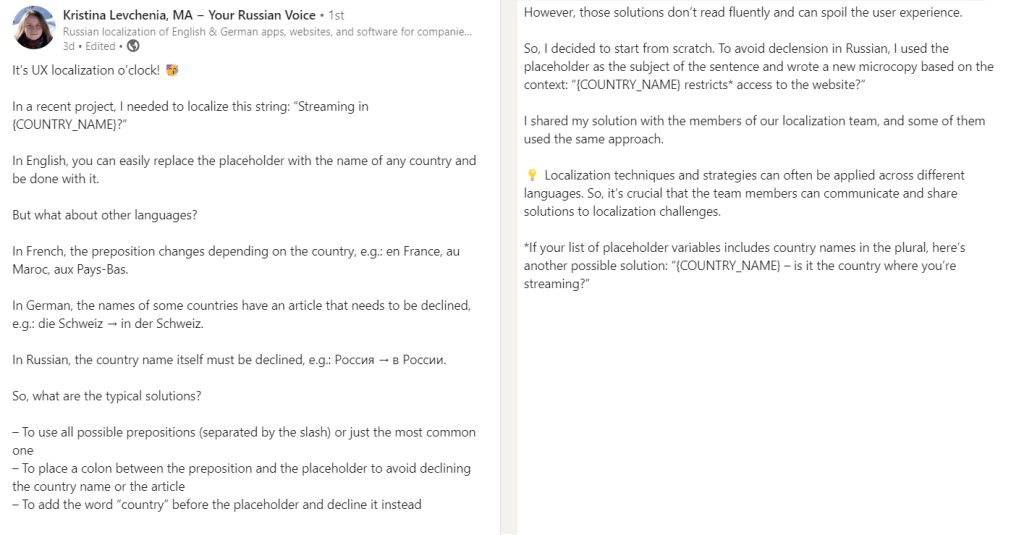
Take a look at Kristina Levchenia’s example below.
Transcript:
It’s UX localization o’clock! 🥳 In a recent project, I needed to localize this string: “Streaming in {COUNTRY_NAME}?” In English, you can easily replace the placeholder with the name of any country and be done with it. However, those solutions don’t read fluently and can spoil the user experience. But what about other languages? In French, the preposition changes depending on the country, e.g.: en France, au Maroc, aux Pays-Bas.
In German, the names of some countries have an article that needs to be declined, e.g.: die Schweiz → in der Schweiz. In Russian, the country name itself must be declined, e.g.: Россия → в России. So, what are the typical solutions?
– To use all possible prepositions (separated by the slash) or just the most common one
– To place a colon between the preposition and the placeholder to avoid declining the country name or the article
– To add the word “country” before the placeholder and decline it instead
So, I decided to start from scratch. To avoid declension in Russian, I used the placeholder as the subject of the sentence and wrote a new microcopy based on the context: “{COUNTRY_NAME} restricts* access to the website?”
I shared my solution with the members of our localization team, and some of them used the same approach.💡 Localization techniques and strategies can often be applied across different languages. So, it’s crucial that the team members can communicate and share solutions to localization challenges.
*If your list of placeholder variables includes country names in the plural, here’s another possible solution: “{COUNTRY_NAME} – is it the country where you’re streaming?”
Types of placeholders you’ll see in localisation projects
One of the reasons translators trip over placeholders is that they look different depending on the platform, framework, and file format. Here’s a breakdown of the most common types.
| Placeholder style | Example | Typically used in |
|---|---|---|
| Printf positional | %s, %d, %1$s | C, Java, Android, PHP |
| iOS-style | %@, %1$@ | iOS/macOS (Objective-C, Swift) |
| ICU MessageFormat | {name}, {count, plural, one {# item} other {# items}} | Cross-platform (JavaScript, Java, PHP) |
| Named curly-brace | {username}, {amount} | Python, .NET, React, many web frameworks |
| Double curly-brace | {{variable}}, {{MoreInfoButton/}} | Angular, Handlebars, Mustache, Vue.js |
| Percent-enclosed | %PROGRAMNAME%, %setup% | Windows apps, installers |
| Dollar-sign | $variable, ${file}, $[file] | Shell scripts, Ruby, Perl |
| HTML tags | <strong>, <a href="..."> | Web content, HTML emails |
| Escape characters | \n (newline), \t (tab) | Nearly all platforms |
Some of these carry extra information. Printf-style placeholders like %d tell the system to expect an integer, while %s expects a string. ICU MessageFormat is far more expressive and can handle pluralisation, gender selection, and number formatting in a single string.
The golden rule applies to all of them: never translate, modify, or delete a placeholder.
How to handle placeholders during translation
The short answer is that you copy placeholders exactly as they appear and position them where the target language grammar requires. But “where the grammar requires” is where the real skill lies.
Repositioning for target language syntax
In English, adjectives come before nouns. In Spanish, they typically come after. Consider this string:
"Please remove the {{item:colour}} bag to check out"
In English, the placeholder (which will be replaced by a colour) sits before “bag”. But in Spanish, the adjective follows the noun, so the translated string becomes:
"Elimina el bolso {{item:colour}} para proceder al pago"
The placeholder moved. The placeholder itself didn’t change. That distinction matters.
Knowing what a placeholder will contain
Context is everything. If you see {count} in a string like "You have {count} new messages", you know a number will be injected. That helps you decide how to structure the rest of the sentence. If you see {user_name}, you know a proper noun is coming.
But when you see %1$s with no documentation, you’re guessing. And guessing leads to errors. This is why providing context notes, screenshots, and placeholder descriptions is so important for development teams running continuous localisation workflows.
Reordering numbered placeholders
Some placeholder systems support reordering. In printf-style strings, %1$s and %2$s allow translators to swap the order of variables to match target-language syntax without breaking the code. The Localization Guide by Translate House documents this well.
For example:
- English:
"Error: %1$s caused %2$s"(file, then error type) - German:
"%2$s wurde durch %1$s verursacht"(error type, then file)
The numbered positions let the system know which value goes where, regardless of where the translator places them in the sentence.
The grammar problem: why placeholders and inflected languages clash
English is relatively forgiving with placeholders because it has minimal inflection. A country name is “Argentina” whether it’s the subject, object, or part of a prepositional phrase. But many languages have case systems, grammatical gender, and noun declension that make placeholders genuinely difficult.
Case and preposition changes
German is a good example. The preposition that precedes a country name can change depending on the country:
| English | German | Why it changes |
|---|---|---|
| I’m from Argentina | Ich komme aus Argentinien | No article needed |
| I’m from Switzerland | Ich komme aus der Schweiz | “Schweiz” takes a feminine article |
| I’m from the USA | Ich komme aus den USA | Plural article |
If you have a string like "I'm from {COUNTRY_NAME}", the German translation can’t simply be "Ich komme aus {COUNTRY_NAME}" because that structure only works for some countries.
Declension in Slavic languages
Russian takes this even further. Country names themselves change form depending on grammatical case. “Россия” (Russia) becomes “в России” (in Russia) in the prepositional case. A placeholder containing the nominative form of a country name will produce grammatically incorrect output in Russian.
French prepositions with countries
French uses different prepositions depending on the country’s gender and whether it starts with a vowel: “en France”, “au Maroc”, “aux Pays-Bas”. A single placeholder for {COUNTRY_NAME} can’t accommodate all of these without creative workarounds.
Kristina Levchenia’s UX localisation example on LinkedIn illustrates these issues beautifully with the string "Streaming in {COUNTRY_NAME}?" and how different languages required entirely different sentence structures.
Workarounds for grammar-placeholder conflicts
When a placeholder clashes with the target language’s grammar, translators have several options. Each comes with trade-offs.
- Use a colon or dash before the placeholder to break the grammatical dependency. For example:
"{COUNTRY_NAME}: ¿es aquí donde estás viendo contenido?"instead of trying to inflect around the placeholder. - Restructure the sentence so the placeholder becomes the subject. The Russian solution in Levchenia’s example turned
"Streaming in {COUNTRY_NAME}?"into"{COUNTRY_NAME} restricts access to the website?", avoiding declension entirely. - Add a generic noun before the placeholder and decline that noun instead. For instance, using “the country {COUNTRY_NAME}” and declining “country” in the target language.
- Use all possible preposition variants separated by slashes. This is the least elegant solution (e.g., “en/au/aux {COUNTRY_NAME}”) but sometimes the only viable one for low-context projects.
The right approach depends on the project, the level of UX polish expected, and how much creative freedom the translator has been given. If you’re working with a transcreation brief, restructuring the sentence is usually preferred.
Text expansion: a hidden complication
When translating strings with placeholders, text expansion is an added concern. Translated text can be significantly longer than the English source, and the placeholder’s runtime value may also vary in length. If UI elements have fixed widths, both the translation and the placeholder’s output need to fit.
Here are some general expansion rates when translating from English, according to IBM’s published guidelines and data compiled by Eriksen Translations:
| Target language | Typical expansion from English |
|---|---|
| German | Up to 35% |
| French | 15–25% |
| Spanish | 20–25% |
| Italian | 15–25% |
| Portuguese | 15–30% |
| Finnish | Up to 30% expansion or contraction |
| Chinese, Japanese, Korean | 10–40% contraction (but vertical expansion) |
| Arabic | ~15% contraction |
For very short strings (button labels, menu items), expansion can hit 100–300%. The English abbreviation “FAQ” becomes “Preguntas frecuentes” in Spanish, a 700% increase in character count. When those short strings also contain placeholders, the combined length can overflow UI containers.
This is where robust internationalisation practices matter. Building flexible layouts from the start, as part of a proper i18n framework, prevents UI breakage when localised strings (with placeholders) are longer than expected.
Common placeholder mistakes and how to avoid them
Placeholder errors can range from embarrassing to application-breaking. Here are the most frequent ones, drawn from localisation QA data and real-world project experience.
Translating placeholder content
A translator once rendered <p style="border: 1px solid red;"></p> into Greek as <π στυλ="περίγραμμα: 1 πίξελ συμπαγές κόκκινο;"></π>. The reasoning? Maybe the developer doesn’t speak English. The result? Completely broken HTML. This example, documented by Smartcat, has become a cautionary tale in the industry.
Deleting placeholders
Sometimes translators accidentally delete a placeholder, especially when it sits at the edge of a translatable segment or is merged with surrounding text. In German, the escape character \n followed by the word “ein” produces \nein, which looks confusingly like the word “nein” (no). Mistakes like this are easy to make without visual cues.
Altering placeholder format
Changing curly braces to square brackets, swapping %s for %d, or adding a space inside a placeholder token will cause runtime errors. The application doesn’t recognise the modified token and either displays it as raw text or crashes.
Ignoring placeholder order
In systems that use positional placeholders (%1$s, %2$s), accidentally duplicating one position while leaving out another can produce garbled output or throw an exception.
How TMS tools protect placeholders
Modern translation management systems have built-in features to prevent placeholder errors. If you’re evaluating a TMS for your software localisation workflow, placeholder handling should be high on your checklist.
| Feature | What it does | Available in |
|---|---|---|
| Placeholder lock/block display | Renders placeholders as non-editable visual blocks | Lokalise, Crowdin, Phrase |
| QA validation | Flags missing, extra, or modified placeholders | Most TMS platforms |
| Universal placeholders | Converts platform-specific formats to a single internal format on import, then back on export | Lokalise |
| Placeholder auto-insertion | Lets translators click to insert placeholders rather than typing them | WordPress Translate, Crowdin, Smartling |
| Pseudo-localisation | Replaces source text with simulated long/accented strings to test UI before real translation | Most enterprise TMS |
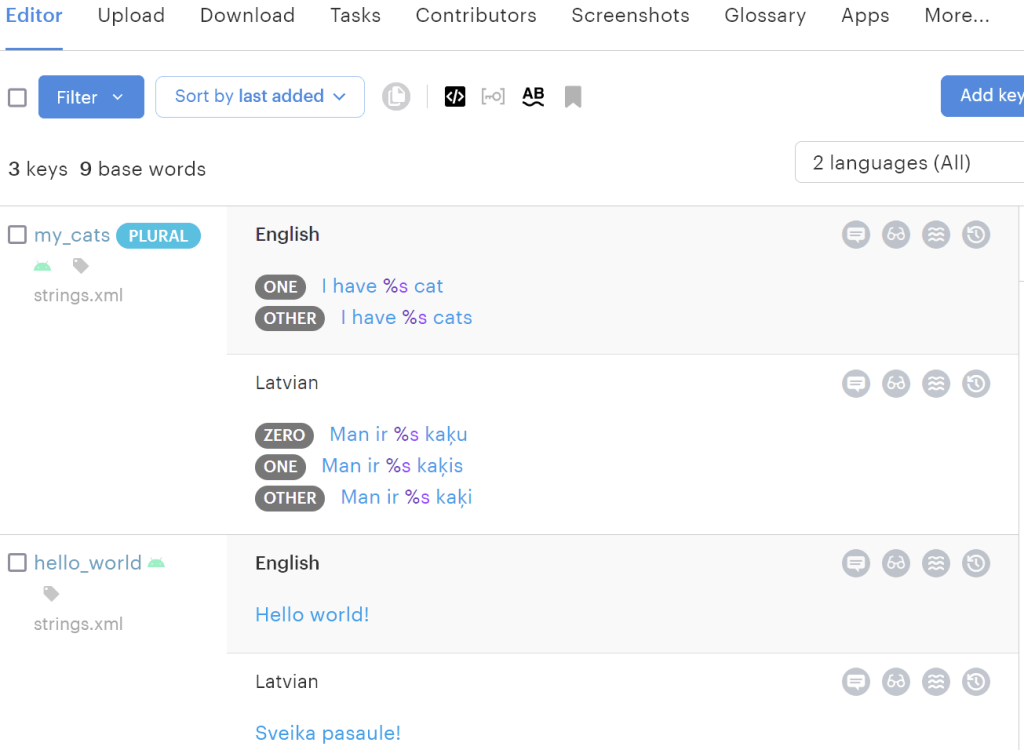
| Context screenshots | Shows translators how the string appears in the actual UI, including where the placeholder output renders | Crowdin, Lokalise, Phrase |
These tools reduce (but don’t eliminate) the risk. Human judgement is still needed for grammatical positioning, cultural appropriateness, and creative restructuring of sentences that don’t work with a direct placeholder transfer.
A checklist for translators working with placeholders
If you regularly work on localisation projects, keep this as a quick reference.
- Identify all placeholders in the source string before you start translating. If your TMS highlights them, even better.
- Understand what each placeholder represents. Ask for context documentation if the project doesn’t provide it.
- Never translate or modify the placeholder itself, including any words inside named placeholders like
{{MoreInfoButton/}}. - Reposition the placeholder to match the natural syntax of the target language. Don’t leave it in the same position as English if that produces awkward or ungrammatical output.
- Watch for escape characters like
\n(newline) and\t(tab). They’re easy to miss, especially when merged with adjacent words. - Check for grammatical conflicts. If the placeholder will be filled with a noun that needs to be declined or preceded by a variable preposition, consider restructuring the sentence.
- Run a QA check before delivery. Most CAT tools and TMS platforms can flag placeholder mismatches.
- Communicate with the development team if a string simply doesn’t work in the target language with the current placeholder setup. Sometimes the source string needs to be redesigned.
Crisol can help you get localisation right
Handling placeholders well is one piece of a much larger puzzle. It requires translators who understand the code, the grammar, and the UX implications of every decision they make in the target language. At Crisol Translation Services, software localisation is our bread and butter. We work with SaaS companies, app developers, and global brands to localise their products across European markets, with a deep specialism in English-to-Spanish.
Whether you need a full SaaS localisation partner, SEO translation that ranks, or a team that can handle the technical demands of continuous localisation workflows, get in touch. We’ll make sure your placeholders (and everything around them) land exactly where they should.
Frequently asked questions about placeholders in translation
What is a placeholder in a digital text environment? A placeholder is a character, word, or string that temporarily stands in for dynamic content that will be inserted at runtime. In a system message like “Printing page %0 / %1”, the %0 and %1 are placeholders: when the message appears to users, the system replaces them with actual page numbers. In automated emails, formats like [user:first_name] are replaced with each recipient’s name when the message is sent. Placeholders allow a single string to serve many users or contexts without requiring a separate translation for each variation.
Should placeholders be translated? Placeholders should never be translated, even when they contain recognisable words. The entire placeholder, including any descriptive words inside it (like {{MoreInfoButton/}}), must be copied into the translation exactly as it appears in the source. Translating any part of a placeholder breaks the code that tells the system what to insert at runtime.
Can translators move placeholders to different positions in a sentence? Yes, and often they must. Word order varies significantly between languages, and a placeholder that logically precedes a noun in English may need to follow it in Spanish or German to produce grammatically correct output. The rule is that the placeholder stays in the position where the final content it represents will appear in the target language sentence. A translator working on “Please remove the {{item:colour}} bag” for Spanish would write “Elimine el bolso {{item:colour}}” because Spanish adjectives typically follow the noun they modify.
What challenges do placeholders create when translating into inflected languages? Languages with grammatical gender, case, or number agreement create problems that English placeholders don’t anticipate. In German, for instance, a placeholder for a country name needs to produce different forms depending on grammatical case: “aus Argentinien” versus “aus der Schweiz” for different countries. In Russian, country names must be declined. Translators in these languages sometimes need to restructure the sentence around the placeholder rather than simply repositioning it, and in some cases work with developers to change how the string is constructed to make grammatically correct translation possible.
Why is translating around placeholders a specialised skill? Because translators who only see an isolated string without context cannot know what the placeholder will represent when rendered. A placeholder labelled {{item}} could be a product name (which stays untranslated), a colour term (which might need to agree grammatically with a nearby noun), or a username (which should be left exactly as entered by the user). Without understanding what each placeholder represents and where the string will appear in the interface, a translator can produce output that is linguistically correct but functionally broken.
What tools help translators handle placeholders correctly? Translation management systems with context screenshots (like Phrase integrated with Figma) allow translators to see exactly where a string appears in the interface alongside the string itself. This resolves most ambiguity about what a placeholder represents and where it should sit in the translated sentence. Without visual context, translators have to rely on placeholder naming conventions and notes from developers, which are not always provided.

Author: Maria Scheibengraf
Maria Scheibengraf is an English-to-Spanish marketing and SEO translator specialised in software (SaaS, martech, fintech), and Operations Manager at Crisol Translation Services, which she co-founded in 2016. With a solid background in programming and marketing, Maria has an in-depth understanding of the technical intricacies involved in software programs, websites, and digital platforms. Maria is also the author of The SEO Translation Bible.


2 thoughts on “How to Translate Around Placeholders In Software Without Breaking the Code”
Great explanation! I work with placeholders almost on a daily basis and I think it’s something that requires translators to use a great deal of common sense because you have to weigh many factors, such as space constraints, gender (or gender-neutral) preferences, etc.
Exactly! Thanks for completing the information :)
Comments are closed.