
Internationalisation is the process of designing and building a product so it can be adapted for any language, region, or culture without requiring changes to its underlying code or architecture. In software development, where the term is most commonly used, this means structuring your codebase, UI, and data handling so that localisation teams can later adapt the product for specific markets without re-engineering it.
The term is abbreviated to i18n – a numeronym where 18 represents the eighteen letters between the “i” and the “n”. You’ll sometimes see it capitalised as I18N, though lowercase is more common. The American English spelling is “internationalization”; both refer to the same process.
The simplest way to think about it: internationalisation builds the frame, localisation fills it in. If your product hasn’t been internationalised, localisation becomes a slow, expensive process of retrofitting – pulling apart hard-coded assumptions about language and formatting that were baked into the codebase during development. If it has been internationalised, adding a new language or launching in a new market becomes a configuration task rather than an engineering project.
In this post:
- Where internationalisation fits: the GILT framework
- Internationalisation vs localisation
- What internationalisation covers in practice
- Pseudo-localisation: testing i18n without waiting for translations
- i18n beyond software: websites and content
- i18n and SEO: the overlooked intersection
- Common i18n mistakes and their consequences
- The cost of skipping internationalisation
- i18n checklist: an audit framework
- Key terminology
- How to get started
- Need help localising your content?
- Frequently asked questions about software internationalisation
Where internationalisation fits: the GILT framework
Internationalisation is one stage in a broader process the language industry calls GILT: Globalisation, Internationalisation, Localisation, and Translation. We cover the full framework in our localisation guide, but here’s the quick version:
| Stage | Abbreviation | Focus |
|---|---|---|
| Globalisation (g11n) | Business strategy | Market selection, regulatory planning, pricing |
| Internationalisation (i18n) | Technical preparation | Making the product adaptable for any market |
| Localisation (l10n) | Cultural adaptation | Adapting for a specific market’s language and expectations |
| Translation (t9n) | Linguistic conversion | Converting text from one language to another |
The sequence matters. Internationalisation needs to happen during development – ideally from the start. When companies skip it and jump straight from globalisation strategy to translation, they end up with products that technically speak the language but break in practice: truncated buttons, mangled date formats, forms that reject valid addresses, and layouts that collapse when the text runs 30% longer than English.
The W3C’s Internationalization Activity provides the most widely cited technical definition and guidance on how internationalisation and localisation relate.
Internationalisation vs localisation
These terms get confused constantly, so it’s worth a direct comparison:
| Internationalisation (i18n) | Localisation (l10n) | |
|---|---|---|
| When | During development | After development (or alongside, in agile workflows) |
| Who | Developers, product teams, architects | Translators, localisation specialists, marketers |
| What | Builds a flexible foundation that can support any locale | Adapts the product for a specific locale |
| Scope | One-time architectural effort (with ongoing maintenance) | Repeated for each target market |
| Example | Externalising UI strings into resource files | Translating those strings into German |
| Example | Building date fields that accept multiple formats | Configuring the app to show DD.MM.YYYY for German users |
| Example | Supporting RTL layout mirroring | Adapting the Arabic version’s navigation and reading flow |
| Example | Using Unicode (UTF-8) across the stack | Ensuring Chinese characters render correctly in all components |
A useful analogy: internationalisation is building a house with standard electrical wiring that accepts any country’s plug adapters. Localisation is fitting the specific plugs for each country.
Neither replaces the other. A well-internationalised product that hasn’t been localised will feel generic. A localised product that wasn’t properly internationalised will feel broken.
What internationalisation covers in practice
The scope of i18n is broader than most development teams initially expect. It touches the codebase, the database, the UI framework, the content pipeline, and the build process. Here’s what it involves, area by area.
String externalisation
This is the single most fundamental i18n practice, and the one most likely to cause problems if skipped.
The problem: When translatable text is hard-coded directly into source code, translators can’t access it without touching the codebase. Every language requires code changes. Every update risks breaking something.
The solution: Store all user-facing text in separate resource files (typically JSON, XLIFF, YAML, or .strings files) and reference them through keys in the code. The application loads the correct resource file based on the user’s locale at runtime.
Here’s a simplified example of the difference:
Hard-coded (bad for i18n):
button.text = "Save changes"
error.message = "Please enter a valid email address"
Externalised (i18n-ready):
button.text = t("save_changes")
error.message = t("email_validation_error")
The resource files then contain the actual text for each locale:
json
// en-GB.json
{
  "save_changes": "Save changes",
  "email_validation_error": "Please enter a valid email address"
}
// de-DE.json
{
  "save_changes": "Änderungen speichern",
  "email_validation_error": "Bitte geben Sie eine gültige E-Mail-Adresse ein"
}
This approach means adding a new language only requires creating a new resource file – no code changes needed. It also means translators work with text files, not source code, which reduces the risk of accidental code damage and lets translation happen in parallel with development.
String externalisation sounds straightforward, but it has some non-obvious implications. Concatenated strings – where you build a sentence by joining fragments like "Welcome, " + username + "! You have " + count + " messages." – break in languages where the word order differs. Japanese, for instance, might place the username at the end of the sentence. The solution is to use placeholder variables within complete strings: "Welcome, {username}! You have {count} messages." This lets translators rearrange the full sentence for each language while the variables get inserted at runtime.
Unicode and character encoding
If string externalisation is the most fundamental i18n practice, character encoding is the most technically consequential. Get it wrong and text becomes garbled, searches fail, databases corrupt data, and entire languages become unusable.
What Unicode is: A universal character encoding standard that assigns a unique code point to every character in every writing system. The current version (Unicode 16.0, released 2024) covers 154,998 characters across 168 scripts, from Latin and Cyrillic to Chinese, Arabic, Tamil, Ethiopic, Cherokee, and emoji.
Why it matters: Before Unicode, different regions used different encoding systems. A file encoded in Shift_JIS (Japanese) would display as gibberish on a system expecting ISO-8859-1 (Western European). Data sent between systems with different encodings could be silently corrupted or lost.
What to do: Use UTF-8 as the default encoding across your entire stack – database, APIs, file storage, HTML pages, and resource files. UTF-8 is backward-compatible with ASCII (so existing English content works unchanged) while supporting every character in Unicode. It’s the encoding standard for the web: as of 2024, over 98% of websites use UTF-8.
Common encoding failures include:
- Accented characters (ü, ñ, é, ç) displaying as question marks or replacement characters (�)
- CJK characters (Chinese, Japanese, Korean) rendering as empty boxes
- Database searches failing to match names with diacritics (“José” not matching “Jose”)
- Form validation rejecting legitimate names that contain non-ASCII characters (Müller, O’Brien, Björk)
- Emoji displaying inconsistently or not at all
Text expansion and contraction
When English text is translated, it often gets longer – sometimes much longer. This has direct consequences for UI design: buttons overflow, menus wrap awkwardly, and carefully balanced layouts break.
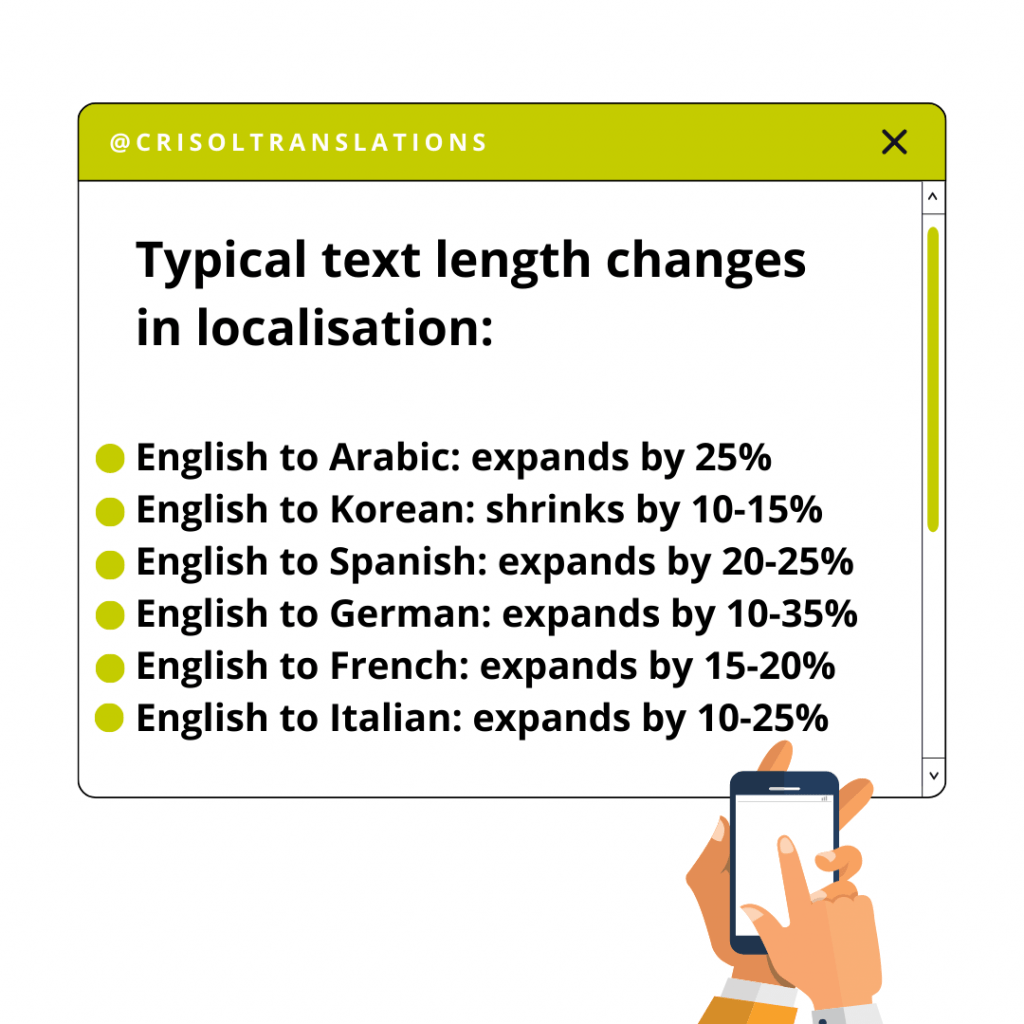
The expansion ratios vary by language and content type, but these approximate ranges (based on typical body text, not isolated words or short strings) give a useful planning baseline:
| Target language (from English) | Typical text expansion/contraction | Notes |
|---|---|---|
| German | +20% to +35% | Compound words like Kraftfahrzeughaftpflichtversicherung (motor vehicle liability insurance) |
| Finnish | +25% to +40% | Agglutinative – words accumulate suffixes |
| French | +15% to +25% | More words needed, plus articles and prepositions |
| Spanish | +15% to +25% | Similar to French |
| Italian | +15% to +25% | Similar to French and Spanish |
| Portuguese | +15% to +25% | Similar pattern to other Romance languages |
| Dutch | +20% to +35% | Similar compound-word tendency to German |
| Polish | +20% to +30% | Inflected language, longer word forms |
| Arabic | −10% to +25% | Varies; script may require more vertical space |
| Russian | +15% to +25% | Cyrillic characters can be wider |
| Chinese (Simplified) | −30% to −50% | Far fewer characters, but each character is wider |
| Japanese | −20% to −40% | Fewer characters; may need more vertical spacing |
| Korean | −10% to −20% | Slightly shorter; Hangul blocks are wider than Latin characters |
For short strings – button labels, menu items, headings – the expansion can be far more dramatic. The English word “FAQ” becomes “Preguntas frecuentes” in Spanish (a 700% increase in character count). “Close” becomes “Schließen” in German. “Submit” becomes “Absenden”.
The i18n response: Design layouts with flexible, relative widths rather than fixed pixel dimensions. Use auto-sizing containers. Test with pseudolocalised strings (more on this below) that simulate worst-case expansion. As a rule of thumb, build in at least 30% extra space for text elements, and more for short strings like buttons and menu labels.
Pluralisation rules
In English, pluralisation is simple: one item, two items. Singular, plural. Most developers build their i18n around this two-form model and assume it’s universal. It isn’t.
Different languages have different numbers of plural forms, governed by complex grammatical rules:
| Language | Number of plural forms | Rules |
|---|---|---|
| English | 2 | Singular (1), plural (everything else) |
| French | 2 | Singular (0 and 1), plural (2+) – note that 0 is singular in French |
| Japanese, Chinese, Korean | 1 | No plural distinction |
| Polish | 4 | Singular (1), few (2–4, 22–24, etc.), many (5–21, 25–31, etc.), other |
| Arabic | 6 | Zero, one, two, few (3–10), many (11–99), other (100+) |
| Russian | 3 | Singular (1, 21, 31…), few (2–4, 22–24…), many (5–20, 25–30…) |
| Czech | 3 | Singular (1), few (2–4), other (5+) |
| Welsh | 6 | Zero, one, two, few, many, other |
This means a seemingly simple message like “You have {count} new messages” needs to be handled differently for each language. In Polish, the correct word for “messages” changes depending on whether the count is 1, 2, 5, 22, or 100. Hard-coding “if count == 1, use singular; else use plural” works for English but produces grammatically incorrect output in most other languages.
The ICU MessageFormat standard and the Unicode CLDR plural rules provide the reference specifications for handling this correctly. Most modern i18n libraries (i18next, FormatJS, ICU4J) implement these rules, so you don’t need to code them manually – but you do need to structure your resource files to support multiple plural forms per string.
Date, time, number, and currency formatting
These seem like small details, but getting them wrong is one of the fastest ways to erode user trust. When a banking app displays a date as 02/11/2026, is that 2 November or 11 February? Depends entirely on the user’s locale.
| Format type | US (en-US) | UK (en-GB) | Germany (de-DE) | Japan (ja-JP) | Brazil (pt-BR) |
|---|---|---|---|---|---|
| Date | 02/11/2026 | 11/02/2026 | 11.02.2026 | 2026年2月11日 | 11/02/2026 |
| Time (afternoon) | 2:30 PM | 14:30 | 14:30 | 14:30 | 14:30 |
| Number (large) | 1,234,567.89 | 1,234,567.89 | 1.234.567,89 | 1,234,567.89 | 1.234.567,89 |
| Currency | $1,234.56 | £1,234.56 | 1.234,56 € | ¥1,234 | R$ 1.234,56 |
| Percentage | 45.5% | 45.5% | 45,5 % | 45.5% | 45,5% |
| Phone number | (555) 123-4567 | 020 7946 0958 | 030 12345678 | 03-1234-5678 | (11) 91234-5678 |
The i18n response: Never hard-code format patterns. Use locale-aware formatting APIs – the JavaScript Intl API, Java’s DateTimeFormatter, or similar library in your stack – that automatically apply the correct format based on the active locale. Store dates as ISO 8601 timestamps internally and format them for display at the presentation layer.
The same principle applies to:
- Addresses: Format, field order, and required fields vary by country (US has ZIP codes and states; UK has postcodes; Japan puts prefecture before city; Germany uses PLZ before city name)
- Names: Some cultures put family name first (East Asia). Some cultures have multiple family names (Spain, Portugal). Some don’t use family names at all (Iceland, parts of Indonesia)
- Measurement units: Metric vs. imperial. Celsius vs. Fahrenheit. Kilometres vs. miles
- First day of the week: Monday in most of Europe and Asia. Sunday in the US, Canada, Japan, and parts of the Middle East. Saturday in some Middle Eastern and North African countries
Right-to-left (RTL) and bidirectional text
Arabic, Hebrew, Persian (Farsi), and Urdu – among others – are written right-to-left. Supporting RTL isn’t as simple as flipping the text direction. It means mirroring the entire UI layout: navigation moves to the right side, scroll bars shift, progress bars fill from right to left, and icons that imply direction (arrows, forward/back buttons) need to be reversed.
The real complexity comes with bidirectional (bidi) text – content that mixes RTL and LTR within the same string. An Arabic sentence that includes an English brand name, a URL, or a number creates a situation where the browser’s bidi algorithm has to switch direction mid-line. Without proper handling (using the Unicode Bidirectional Algorithm and HTML dir attributes or <bdi> tags), the text can reorder itself in confusing and sometimes comical ways.
If you’re building for markets that use RTL scripts, plan for it from the start. Retrofitting RTL support into a UI that was designed for LTR is one of the most time-consuming i18n tasks, because it touches every component and layout decision in the application.
Layout and UI flexibility
Beyond text expansion and RTL support, i18n-ready layouts need to accommodate several other variables:
- Vertical text: Chinese, Japanese, and Mongolian can be written vertically. Some contexts (traditional publishing, signage, certain UI patterns) still use vertical layout
- Text wrapping rules: Chinese and Japanese don’t use spaces between words, which means line-breaking algorithms work differently. Thai also lacks spaces between words. These languages need specialised text segmentation
- Font coverage: Not every font supports every script. Your default font may cover Latin, Cyrillic, and Greek but fail on CJK characters, Thai, or Devanagari. i18n-ready products need font stacks that provide fallbacks for all target scripts
- Input methods: Typing Chinese or Japanese requires an Input Method Editor (IME) that converts keystrokes into characters. Your text fields need to work correctly with IME input – which means handling composition events properly, not just keydown/keyup
- Sorting and collation: Alphabetical order varies by locale. Swedish puts Ö, Ä, and Å at the end of the alphabet, not with O, A, and A. Japanese has multiple sort orders depending on the writing system used. Spanish historically sorted “ch” and “ll” as separate letters (though this changed in 1994, older conventions still appear)
Pseudo-localisation: testing i18n without waiting for translations
Pseudo-localisation is one of the most useful i18n testing techniques, and one of the least widely adopted. The idea is simple: before you spend time and money on actual translations, test your UI with artificially generated strings that simulate the challenges translations will introduce.
A pseudo-localisation tool takes your source strings and transforms them by:
- Adding accented characters: “Save changes” becomes “Šåvé çhåñgéš” – this tests whether your stack handles non-ASCII characters correctly throughout the pipeline (display, storage, search, sorting)
- Expanding text length: Padding strings with extra characters to simulate the 30–40% expansion you’d see in German or Finnish – this reveals truncated buttons, broken layouts, and overflow issues
- Adding brackets or markers: Wrapping strings in brackets like “[Šåvé çhåñgéš]” – this makes it easy to spot any string that wasn’t properly externalised (because it will appear in plain English without brackets)
- Simulating RTL: Reversing character order to test layout mirroring before Arabic or Hebrew translations are available
The result is that you can catch the vast majority of i18n bugs – hard-coded strings, truncation issues, encoding failures, layout breaks – during development, before any real translation work begins. This matters because fixing i18n bugs during development is estimated to cost roughly 14 times less than fixing them after release, according to research by Lingoport.
Microsoft’s globalisation guidance recommends pseudo-localisation as a standard part of the development workflow, and most modern i18n libraries and TMS platforms support it out of the box.
i18n beyond software: websites and content
While internationalisation is most commonly discussed in a software development context, the same principles apply to websites and content systems. If your website’s CMS, URL structure, or content pipeline wasn’t built with multiple languages in mind, adding new languages later means structural rework.
Website i18n considerations include:
- URL architecture: Deciding between subdirectories (/es/, /de/), subdomains (es.example.com), or country-code top-level domains (example.es). Each has different implications for SEO, maintenance overhead, and hosting complexity
- CMS configuration: Ensuring your content management system supports multilingual content – separate content trees per locale, locale-aware metadata fields, and language-switching logic
- Content models: Structuring content so that translatable fields are clearly separated from non-translatable ones (image assets, layout settings, configuration values)
- Media and assets: Images with embedded text, PDFs, video subtitles, and infographics all need separate locale-specific versions
We cover website and content localisation strategies in more detail in our ecommerce localisation guide and our overview of software localisation, which includes CMS and web application considerations.
i18n and SEO: the overlooked intersection
Most i18n guides stop at code and content. They don’t mention SEO. But several of the architectural decisions you make during internationalisation have direct implications for how your site performs in international search.
Hreflang implementation
Hreflang tags tell search engines which language and region each version of a page targets. They’re an i18n concern because they need to be built into the site’s architecture – added to the <head> of each page, or to an XML sitemap – and maintained as new locales are added. Incorrect hreflang implementation is one of the most common technical SEO errors on multilingual sites.
The format combines an ISO 639-1 language code with an optional ISO 3166-1 Alpha-2 region code: hreflang="en-gb" for British English, hreflang="es-mx" for Mexican Spanish. These codes map directly to the locale codes your i18n infrastructure already uses.
URL structure decisions
The URL architecture you choose for your internationalised site affects how search engines assign regional targeting. Google treats ccTLDs (example.es) as the strongest regional signal, followed by subdirectories (/es/) set up with geotargeting in Google Search Console, followed by subdomains (es.example.com). The choice also affects how link equity flows between language versions and how easy the structure is to maintain as you add more locales.
Locale-aware content serving
How your server determines which locale to serve – geolocation, browser language headers, user preferences, or URL path – affects both user experience and search engine crawling. If you serve content based on IP geolocation without also making all locale versions accessible via distinct URLs, search engines may only ever see one version.
For more on how i18n decisions affect international search performance, see our guide to SEO translation and localisation and our piece on how search intent differs across cultures.
Common i18n mistakes and their consequences
Most i18n failures are predictable. They stem from the same handful of assumptions that development teams make early on and only discover are wrong when they try to localise.
| Mistake | What happens | Example |
|---|---|---|
| Hard-coding strings | Translators can’t access text without code changes; every locale requires a developer | A button says “Submit” in the codebase and can’t be changed without a code deployment |
| Concatenating strings | Sentence fragments can’t be reordered for different grammars | "Welcome, " + name + "!" breaks in Japanese where the name goes last |
| Assuming two plural forms | Grammatically incorrect output in most non-English languages | “You have 5 new message” in Polish, where the plural form depends on the number |
| Fixed-width layouts | UI breaks when translated text is longer | German translation overflows a button designed for the English word “Close” |
| Hard-coding date/number formats | Confusing or incorrect data display for non-US users | 02/11/2026 shown to UK users who read it as 2 November |
| Single-byte encoding | Characters from non-Latin scripts display as garbled text | Japanese user sees ???????? instead of their username |
| Embedding text in images | Images can’t be translated without redesigning them | An infographic with English labels needs to be recreated from scratch for each language |
| Ignoring RTL | Layout is unusable for Arabic, Hebrew, and Persian users | Navigation and form elements face the wrong direction; progress indicators reverse |
| Hardcoding currency/units | Prices and measurements are meaningless or misleading | Showing $ prices to European users, or weights in pounds to markets that use kilograms |
| Using flags for language selectors | Flags represent countries, not languages; many languages are spoken across multiple countries | A Spanish flag for “Spanish” excludes 400+ million Spanish speakers in Latin America |
That last one deserves emphasis. Using flags as language selectors is one of the most persistent UI design mistakes in multilingual products. Spanish is spoken in over 20 countries. Portuguese is official in 9. French in 29. English is the primary language in dozens. No single flag represents a language, and using one inevitably signals to speakers in other countries that the product wasn’t built with them in mind.
The cost of skipping internationalisation
The most common argument against prioritising i18n is that it’s an upfront cost for a future benefit. This is technically true – but the cost of retrofitting is consistently, dramatically higher than the cost of building it in from the start.
Research by Lingoport, a company that specialises in i18n tooling, found that fixing i18n-related bugs after product launch can cost up to 14 times more than addressing them during development. This ratio is consistent with broader software engineering research on the cost of fixing defects at different stages (IBM Systems Sciences Institute data, among others).
Beyond the direct engineering costs, there are opportunity costs. Every sprint spent retrofitting i18n is a sprint not spent on features. Every market launch delayed by i18n rework is revenue lost to competitors who got there first. And every localisation project that uncovers fundamental i18n gaps – strings that can’t be externalised without refactoring, date formats hard-coded into database schemas, layouts that can’t accommodate text expansion – adds weeks or months to what was supposed to be a straightforward translation project.
For SaaS companies in particular, where agile development and continuous delivery are the norm, baking i18n into the development pipeline from day one means new locale support can be shipped as part of regular release cycles rather than requiring special “internationalisation projects” that pull engineers off their roadmap work. We cover this workflow in more detail in our software localisation guide.
i18n checklist: an audit framework
Whether you’re building a new product or assessing the i18n readiness of an existing one, this checklist covers the key areas to evaluate:
| Area | What to check | Status |
|---|---|---|
| Character encoding | UTF-8 used consistently across database, APIs, file storage, and frontend | ☐ |
| String externalisation | All user-facing text stored in resource files, not hard-coded | ☐ |
| String concatenation | No concatenated sentence fragments; all strings are complete with placeholders | ☐ |
| Pluralisation | Plural forms handled via CLDR rules, not hard-coded singular/plural | ☐ |
| Date/time formatting | Locale-aware formatting APIs used; no hard-coded patterns | ☐ |
| Number/currency formatting | Decimal separators, grouping, and currency symbols driven by locale | ☐ |
| Text expansion | UI elements use flexible widths; tested with 30%+ expanded strings | ☐ |
| RTL support | Layout mirroring implemented; bidi text handled correctly | ☐ |
| Font coverage | Font stack includes fallbacks for all target scripts | ☐ |
| Image text | No translatable text embedded in images or icons | ☐ |
| Input handling | Forms accept international characters, phone formats, address structures, and name conventions | ☐ |
| Sorting/collation | Locale-aware sorting for lists, search results, and alphabetical indexes | ☐ |
| Locale detection | Mechanism for determining user locale (URL, browser settings, user preference) | ☐ |
| Resource file structure | Organised, extensible structure for managing translations across locales | ☐ |
| Pseudo-localisation | Pseudo-localisation testing integrated into development workflow | ☐ |
| URL architecture | Locale-specific URLs (subdirectory, subdomain, or ccTLD) with hreflang tags | ☐ |
| Build pipeline | Localisation integrated into CI/CD; new locales don’t require code changes | ☐ |
Key terminology
| Term | Definition |
|---|---|
| i18n | Numeronym for “internationalisation” (i + 18 letters + n) |
| l10n | Numeronym for “localisation” (l + 10 letters + n) |
| g11n | Numeronym for “globalisation” (g + 11 letters + n) |
| t9n | Numeronym for “translation” (t + 9 letters + n) |
| GILT | Globalisation, Internationalisation, Localisation, Translation |
| Locale | A specific combination of language and region (e.g. en-GB, de-DE, ja-JP) that determines formatting and cultural defaults |
| UTF-8 | The dominant Unicode encoding format, supporting virtually all writing systems |
| ICU | International Components for Unicode – a widely used library for i18n functions including formatting, collation, and plural rules |
| CLDR | Unicode Common Locale Data Repository – the standard reference for locale-specific formatting rules |
| Resource file | A file containing translatable text strings, separate from source code (formats include JSON, XLIFF, YAML, .strings, .properties) |
| RTL | Right-to-left – the text direction used by Arabic, Hebrew, Farsi, and Urdu |
| Bidi | Bidirectional text – content that mixes RTL and LTR scripts within the same string or document |
| Pseudo-localisation | A testing technique that simulates translation challenges (accented characters, text expansion, RTL) without actual translation |
| Hreflang | An HTML attribute that tells search engines which language and region a page targets |
| TMS | Translation Management System – software that organises and automates localisation workflows |
| CAT tool | Computer-Assisted Translation tool – software that aids translators with translation memory, glossaries, and quality checks |
| IME | Input Method Editor – software that enables typing in languages with more characters than can fit on a keyboard (Chinese, Japanese, Korean) |
How to get started
If you’re building a new product
Integrate i18n into your development standards from the first sprint. This means: externalise all strings from day one, use UTF-8 everywhere, choose an i18n library appropriate to your framework (i18next for JavaScript/React, FormatJS for React, NSLocalizedString for iOS, Android’s resource system for Android), use locale-aware formatting APIs for all dates, numbers, and currencies, and design your UI with flexible layouts that accommodate text expansion.
The overhead is minimal when it’s part of the workflow from the start. Most developers find that once the pattern is established, writing i18n-ready code takes no longer than writing hard-coded code.
If you’re retrofitting an existing product
Start with an audit using the checklist above. Prioritise the items that will cause the most visible problems: character encoding issues first (they affect data integrity), then string externalisation (the largest effort, but the highest payoff), then format handling and layout flexibility.
Don’t try to internationalise everything at once. Identify the features or pages closest to your first target market’s launch, internationalise those first, and expand from there. This gives you a working pipeline and a realistic sense of the effort required for the rest of the product.
If you’re a localisation manager, not a developer
Your role in i18n is to advocate for it, specify what’s needed, and test the output. Push for i18n to be included in sprint planning and definition-of-done criteria. Provide the development team with concrete examples of what breaks when i18n is missing – the pluralisation issues, the truncated German buttons, the garbled character encoding. Run pseudo-localisation tests regularly. And when the product is ready for localisation, make sure the technical foundation actually works before commissioning translations.
Need help localising your content?
At Crisol, we work at the intersection of translation, localisation, and SEO. We’re a specialist team working across most European languages, with a particular focus on English-to-Spanish marketing and SEO translation for SaaS, hospitality, food, education, and wellness brands. Whether you need a single freelancer for a targeted project or a full boutique agency for a multi-market rollout, we work as a hybrid – you choose the model that fits. If your product is internationalised and ready for localisation, get in touch.
Frequently asked questions about software internationalisation
What is internationalisation in software development? Internationalisation (abbreviated as I18N) is the process of designing and building software so that it can be easily adapted for different languages and regions later, without requiring major changes to the underlying code. It covers things like separating user-facing text from the codebase, using Unicode to support multiple character sets, building flexible layouts that accommodate text expansion, and ensuring the software can handle right-to-left languages and different date, time, and currency formats.
What is the difference between internationalisation and localisation? Internationalisation happens during development: it is the work of preparing a codebase to support multiple languages without needing to be rebuilt later. Localisation comes once the product is complete and involves actually adapting it for a specific market, including translating the interface, adjusting graphics, adding local payment options, and adapting date and currency formats. Skipping or rushing the internationalisation stage makes localisation significantly harder and more expensive.
Why is internationalisation important? Because retrofitting a codebase that was never designed for multiple languages is costly and time-consuming. Hard-coded text, fixed layouts, embedded text in images, and string concatenation all create problems that are much easier to avoid at the design stage than to fix after the fact. Internationalising early also speeds up market entry: once the foundation is in place, adding a new language requires providing translated strings rather than rebuilding parts of the product.
What does I18N stand for? I18N is a numeronym for “internationalisation”: the letter I, followed by 18 characters, followed by the letter N. The same pattern applies to L10N (localisation) and G11N (globalisation). These abbreviations are widely used in the software industry to avoid spelling out the full words each time.
What is a locale in software development? A locale is a set of parameters that defines a user’s language, country, and any regional variation. For example, en-US defines American English and fr-FR defines French as spoken in France. Using locales allows software to automatically apply the correct formats for dates, times, currencies, and other culturally dependent data based on where the user is, without hard-coding those values for each country individually.
What is string concatenation and why is it a problem for localisation? String concatenation is the practice of joining separate pieces of text programmatically to form a sentence, for example combining a username variable, the word “have”, a number variable, and the word “messages”. This works in English but causes problems in other languages because word order, grammatical gender, and noun-adjective agreement vary significantly between languages. A sentence structure that makes sense in English may be grammatically incorrect or confusing when the same fragments are assembled in another language. Storing complete, translatable strings rather than concatenating them avoids this problem.
Why shouldn’t text be embedded in images? Text embedded in images cannot be translated, resized, or read by assistive technologies used by visually impaired users. If your software contains images with text baked into them, those images would need to be recreated for every language you support. Using CSS to overlay text on images instead keeps the text accessible, translatable, and scalable.
How much does text expand when translated from English? It varies by language. Spanish typically expands by 20 to 25%, German by 10 to 35%, French by 15 to 20%, Italian by 10 to 25%, and Arabic by around 25%. Korean, by contrast, tends to shrink by 10 to 15%. Some languages such as Japanese and Chinese also require larger font sizes for legibility. UI layouts need to accommodate this variation, otherwise translated text gets cut off or breaks the interface.
What Unicode encoding should software use for internationalisation? UTF-8 is the standard recommendation for most software projects. It is compatible with a wide range of character sets and supports virtually all languages, including those that use non-Latin scripts such as Arabic, Chinese, Cyrillic, and Hebrew. Using UTF-8 throughout the codebase ensures that the software can handle any language without encoding-related display issues.
What are the main benefits of software internationalisation? When software is internationalised properly, adding a new language later involves providing translated strings rather than rewriting code. Maintenance also gets easier because user-facing text lives in one place. Beyond the development workflow, international users get a more coherent experience: correct currencies, familiar date formats, properly rendered right-to-left text. The cost of skipping this work tends to surface later, when the codebase needs to be rebuilt to support markets that were never planned for at the start.

Author: Maria Scheibengraf
Maria Scheibengraf is an English-to-Spanish marketing and SEO translator specialised in software (SaaS, martech, fintech), and Operations Manager at Crisol Translation Services, which she co-founded in 2016. With a solid background in programming and marketing, Maria has an in-depth understanding of the technical intricacies involved in software programs, websites, and digital platforms. Maria is also the author of The SEO Translation Bible.


