
A CAT tool (computer-assisted translation tool) is software that professional translators use to produce and manage translations. It breaks source content into segments and stores each approved translation in a database called a translation memory. As new work comes in, the tool searches that database for matching or similar content and surfaces those matches for the translator to consider. Every decision about whether to accept or rework a match stays with the human.
This is what separates CAT tools from machine translation. Google Translate and similar systems generate output automatically, with no human involvement at the point of translation. In a CAT tool workflow, the translator makes every call; the software handles memory retrieval and consistency checking in the background. Widely used examples include Trados Studio, memoQ, Phrase (formerly Memsource), Smartcat, Wordfast, and OmegaT.
For organisations working with external translators or managing multilingual content across markets, how these tools are configured and maintained matters. Translation memory ownership and terminology setup feed into the quality of what gets delivered. Match-rate pricing structures affect cost in ways that compound over time.
This guide covers the practical role CAT tools play across a full translation workflow, from what they do at each stage to what organisations should understand when these tools are embedded in the process.
In this post:
- What does a CAT tool actually do?
- What are the main features of a CAT tool?
- How does machine translation fit into a CAT tool workflow?
- What file formats do CAT tools support?
- Do CAT tools support real-time collaboration?
- Types of translation software and where CAT tools fit
- Which CAT tools do professional translators use most?
- Are there free CAT tools?
- Is Google Translate a CAT tool?
- What is the difference between a CAT tool and a TMS?
- Benefits of using a CAT tool
- Implementing CAT tools in professional translation workflows
- How does AI fit into modern CAT tools?
- What content types benefit most from CAT tools?
- How do you choose the right CAT tool?
- Working with a translation partner: what to ask about CAT tools
- Working with Crisol on CAT-tool-supported projects
- Frequently asked questions about CAT tools
What does a CAT tool actually do?
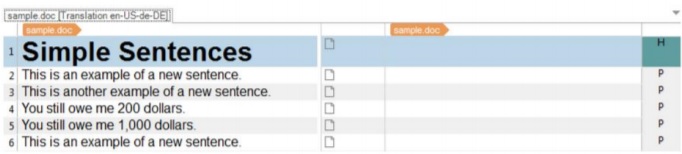
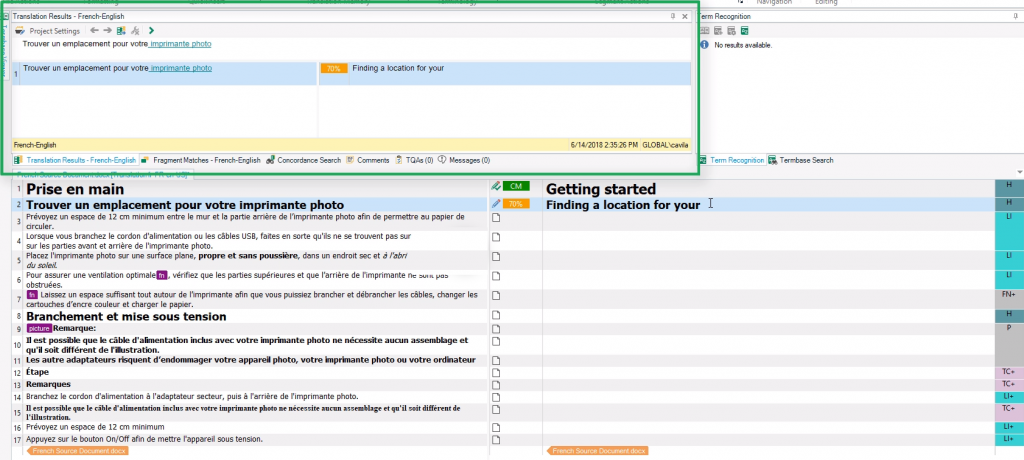
A CAT tool segments the source document into individual units (typically sentences or short paragraphs) and displays them in a side-by-side editing interface. The source text appears on one side; the translator types their translation alongside it. Once all segments are complete, the tool reassembles the document in its original format, preserving the layout, formatting, and file structure.
That segmentation is what makes everything else possible. Because the software processes text segment by segment, it can check each unit against previously translated content stored in a translation memory, flag terminology inconsistencies using an approved glossary, and run automated quality checks before the file is exported. The translator retains full control throughout.
According to research compiled by Bureau Works, 88% of professional translators use at least one CAT tool for some of their work, with 83% using their chosen tool for most or all projects. The CAT tool market is projected to reach USD 4.5 billion by 2033, growing at 12.7% annually, which reflects how central this software has become to professional translation at every level.
Widely used CAT tools include:
- memoQ
- Smartcat
- Trados Studio
- Wordfast
- OmegaT
- Phrase (formerly Memsource)
What are the main features of a CAT tool?
Translation memory
A translation memory (TM) is a database that stores every segment a translator has worked on, paired with its source text. When a new document contains a segment that matches or closely resembles something already in the TM, the tool surfaces the stored translation. The translator can accept it, adjust it, or ignore it and translate from scratch. For a detailed breakdown of how TM works across project types, see Crisol’s guide to translation memory.
Matches are categorised by how closely the new segment resembles what is in the memory:
| Match type | Similarity | What it means |
|---|---|---|
| Context match (101%) | Identical segment, identical surrounding context | Near-certain reuse; often near-free |
| Exact match (100%) | Identical segment, different context | Very reliable; reduced rate applies |
| High fuzzy match | 85–99% similar | Minor differences; translator edits quickly |
| Mid fuzzy match | 75–84% similar | Moderate differences; faster than full translation |
| Low fuzzy / no match | Below 75% | Essentially new content; full rate applies |
| Repetitions | Exact matches repeating within the same file | Heavily discounted or free |
Research from Cologne University of Applied Sciences found that translation memory use reduces translation delivery time by an average of 50% and decreases the volume of translation updates needed by 20–30%.
Glossaries and termbases
A term base (also called a glossary or termbase) is a list of approved translations for specific words and phrases. Client brand names, product names, technical terminology, and legal phrases all belong here.
When a translator encounters a term that appears in the term base, the CAT tool highlights it and suggests the approved translation. This prevents individual translators on the same project from each making different choices for the same term, which matters particularly in marketing work where brand voice can quickly become inconsistent. For a full explanation of how to build and manage one, see our guide to translation glossaries and termbases. See our guide to marketing translation for more on why terminology consistency affects brand perception across languages.
Quality assurance checks
Most CAT tools include automated QA that runs before export. Common checks cover:
- Untranslated segments
- Inconsistent translations of repeated segments
- Missing or extra numbers and dates
- Punctuation mismatches
- Tag errors (relevant for HTML, XML, and software strings)
- Spelling errors in the target language
- Segment length violations (relevant for subtitles, UI strings, and packaging)
Some tools support structured QA frameworks such as the MQM (Multidimensional Quality Metrics) model, which categorises errors by type and severity to produce a quality score.
How does machine translation fit into a CAT tool workflow?
Most modern CAT tools allow translators to pull in suggestions from an MT engine alongside TM matches. When there is no TM match, or when the match quality is low, the tool can surface an MT suggestion instead. The translator evaluates both and decides what to use as a starting point.
This is different from using MT on its own. The translator is still in control of every segment, the TM and glossary still apply, and the MT suggestion is one input among several. The distinction matters for quality-sensitive content, and it is central to understanding the difference between CAT-tool-supported translation and raw MT output.
What file formats do CAT tools support?
A CAT tool extracts the translatable text from the source file, processes it through the segmented editor, and re-inserts the translated content back into the original file structure on export. Most tools handle:
- Microsoft Word, Excel, and PowerPoint
- HTML, XML, and JSON
- XLIFF and SDLXLIFF (standard localisation file formats)
- YAML and properties files (common in software development)
- InDesign (IDML)
- Markdown and plain text
File format support varies between tools. If you regularly work with specialised formats (DITA, FrameMaker, or game localisation files, for example), it is worth checking the tool’s format compatibility list before committing to a licence.
Do CAT tools support real-time collaboration?
Cloud-based CAT tools allow translators, editors, and reviewers to work on the same file simultaneously. Changes appear in real time, translation memories update as work progresses, and there is no need to pass files back and forth. This removes the version-control problems that arise when multiple people work on the same document through email or shared drives.
Desktop tools handle collaboration differently: translators typically export their TMs and glossaries at the end of a project, and a project manager manually merges them into a master file. This works, but it is slower and more error-prone.
Types of translation software and where CAT tools fit
The term computer-assisted translation is often used loosely, which leads to confusion about what does and does not qualify as a CAT tool.
In professional translation workflows, a tool is only considered a CAT tool if it supports a human-in-the-loop process and includes core features such as translation memories and terminology resources. Software that automates translation on its own, or that focuses purely on administration, falls into different categories.
Understanding these distinctions helps organisations evaluate tooling more accurately and avoid mismatched expectations. Within translation software, we typically distinguish between the following groups:
- Translation memory alignment tools: Alignment tools link existing source and target files that were translated outside a CAT tool and convert them into translation memory data. They are commonly used when onboarding legacy content or migrating between tools.
- CAT tools: These are the tools translators work in while translating. They segment the source text and support the translator with translation memories, glossaries, and quality checks. The translator remains fully responsible for the output, using the tool to maintain consistency and efficiency rather than to automate decisions.
- Machine translation (MT) engines: These systems generate translations automatically using algorithms. They operate without human involvement by default. In professional environments, MT output is often reviewed or post-edited, and MT engines are frequently integrated into CAT tools as a suggestion layer rather than used on their own.
- Translation management systems (TMS): A TMS provides an administrative layer around translation work. It is used to manage projects, workflows, resources, and timelines. A TMS does not replace a CAT tool. Instead, it typically connects to one or more CAT tools where the actual translation work takes place.
- Quality assurance (QA) tools: QA tools are designed to detect issues rather than produce translations. They identify formatting problems, inconsistencies, missing elements, or linguistic anomalies. Most CAT tools include basic QA functionality, while standalone QA tools are used for more extensive checks.
- Terminology management software: These tools are used to create and maintain term bases. They store approved terms along with definitions, usage notes, and context. Terminology tools are usually integrated into CAT tools so translators can reference them during translation.
- CAT tools: These are the programs that segment the text and enable the human translator to work more efficiently by providing additional tools, such as translation memories, glossaries, and quality assurance checks.
In practice, professional translation environments rely on combinations of these tools. CAT tools sit at the centre, while other systems support coordination, automation, reuse, and quality control around them.
What are the main types of CAT tool?
CAT tools fall into one of three deployment categories:
| Desktop | Cloud-based | Hybrid | |
|---|---|---|---|
| Access | Single device, locally installed | Any browser, any device | Online with an offline mode |
| Collaboration | Manual file exchange | Real-time, built in | Real-time online; syncs when reconnected |
| Internet required | No | Yes | For collaboration and sync |
| Setup | Installation required | None | Installation for offline capability |
| Best for | Freelancers working offline | Teams and agencies | Translators who need both options |
| Examples | Trados Studio, memoQ desktop, OmegaT | Phrase, Smartcat, MateCat | memoQ cloud, Trados cloud |
Desktop tools dominated the industry for years. The shift towards cloud-based tools accelerated as remote teams became the norm and agencies needed to coordinate across multiple translators. Hybrid tools emerged to cover professionals who work in areas with unreliable internet or need offline capability for confidential projects.
Which CAT tools do professional translators use most?
The tools below account for the majority of professional CAT tool use. No single tool is right for every context; the right choice depends on budget, team structure, and the type of content you translate.
| Tool | Type | Strengths | Free option? |
|---|---|---|---|
| Trados (SDL Trados Studio / Trados 2024) | Desktop + cloud | Widest agency adoption, comprehensive features, large plugin ecosystem | Trial only |
| memoQ | Desktop + cloud | Strong collaboration features, popular with European agencies | Trial only |
| Phrase (formerly Memsource) | Cloud | Built for continuous localisation, strong TMS integration | Trial only |
| Smartcat | Cloud | Free tier, built-in freelancer marketplace, easy onboarding | Yes |
| Wordfast | Desktop + cloud | Lightweight, Microsoft Word integration, affordable | Wordfast Anywhere (limited, free) |
| OmegaT | Desktop | Open source, fully free, surprisingly capable | Yes |
| MateCat | Cloud | Free, browser-based, MT integration included | Yes |
| Déjà Vu | Desktop | Strong on repetitive and technical content | Trial only |
Trados has the largest global market share and is the tool most agencies expect translators to know. memoQ is particularly strong for collaborative projects involving multiple translators. OmegaT and MateCat are the practical choice for freelancers who need a capable free tool.
Are there free CAT tools?
Yes. Several professional-grade CAT tools are available at no cost.
OmegaT is open-source and fully free. It supports TM, glossaries, and a wide range of file formats. The interface is not as polished as paid tools, but it handles professional work well. Many translators start here before investing in a commercial licence.
MateCat is a free, browser-based tool with no installation required. It includes TM, MT integration via ModernMT and Microsoft Translator, and supports Word, Excel, HTML, and several other formats. Project data is stored in the cloud.
Smartcat offers a free tier covering core CAT features: TM, glossaries, and real-time collaboration. It also includes a built-in marketplace for finding and hiring translators.
Wordfast Anywhere is a browser-based, limited version of Wordfast Classic. It handles common file formats and is accessible without a licence.
For freelancers starting out or working on lower-volume projects, these tools provide a solid foundation without the upfront cost. The main trade-off with free tools is feature depth and support: paid tools generally offer more format compatibility, better MT engine options, and dedicated customer support.
Is Google Translate a CAT tool?
Is Google Translate a CAT tool?
No. Google Translate is not a CAT tool.
Google Translate is an example of machine translation. It generates translations automatically using algorithms, without human involvement by default. While its output can be reviewed or post-edited by a professional, the system itself is designed to replace human input at the point of translation.
CAT tools work differently.
A CAT tool is built around a human-in-the-loop workflow. The translator remains responsible for every decision, using the software to support consistency, reuse approved content, and apply quality checks while working. The tool assists the translator rather than producing a finished translation on its own.
This distinction matters in professional contexts.
Machine translation is useful for speed, exploration, or high-level understanding. It becomes risky when used as a standalone solution for live content, regulated material, or brand-critical communication. CAT tools, by contrast, are designed for environments where quality, traceability, and consistency need to be maintained over time.
In many professional setups, the two coexist.
Machine translation engines are often integrated into CAT tools as a suggestion layer. Translators can accept, adapt, or reject those suggestions based on context and intent. The CAT tool provides the framework that keeps decisions consistent and auditable across projects.
Understanding this difference helps organisations set realistic expectations. When a provider says they use CAT tools, they are describing a controlled translation process, not an automated shortcut.
In simpler words:
- Google Translate is an example of machine translation (whose output should always be reviewed by a professional, human linguist). The machine does most of the work.
- A CAT tool involves machine-aided human translation. The human does most of the work.
There’s a lot to say about machine translation, especially around its evolution from statistical engines to neural networks, so you might want to check out this blog post for more information about the world of machine translation tools.
What is the difference between a CAT tool and a TMS?
This is one of the most common points of confusion in the industry. A CAT tool is what translators use to translate. A translation management system (TMS) is what project managers and agencies use to run the whole operation.
| CAT tool | TMS | |
|---|---|---|
| Primary user | Translators | Project managers, localisation managers |
| Core purpose | Assist the translation task itself | Manage the end-to-end workflow |
| Key features | TM, glossary, QA, segmented editor | Vendor management, invoicing, workflow automation, CMS integrations |
| Scope | The translation phase | The full project lifecycle |
| Examples | Trados, memoQ, OmegaT, MateCat | XTM, Phrase TMS, XTRF, Plunet |
In practice, the boundary has blurred. Phrase started as a TMS and added a full CAT editor. memoQ offers both a translator-facing CAT environment and agency-facing project management tools. Enterprise buyers often use a single platform that covers both functions.
For a detailed breakdown of what a TMS does and when one is worth investing in, see our guide to translation management systems.
Benefits of using a CAT tool
CAT tools are widely used because they solve recurring problems in professional translation workflows. Their value becomes clearer over time, especially when content is updated, reused, or scaled across markets.
Improved consistency across content
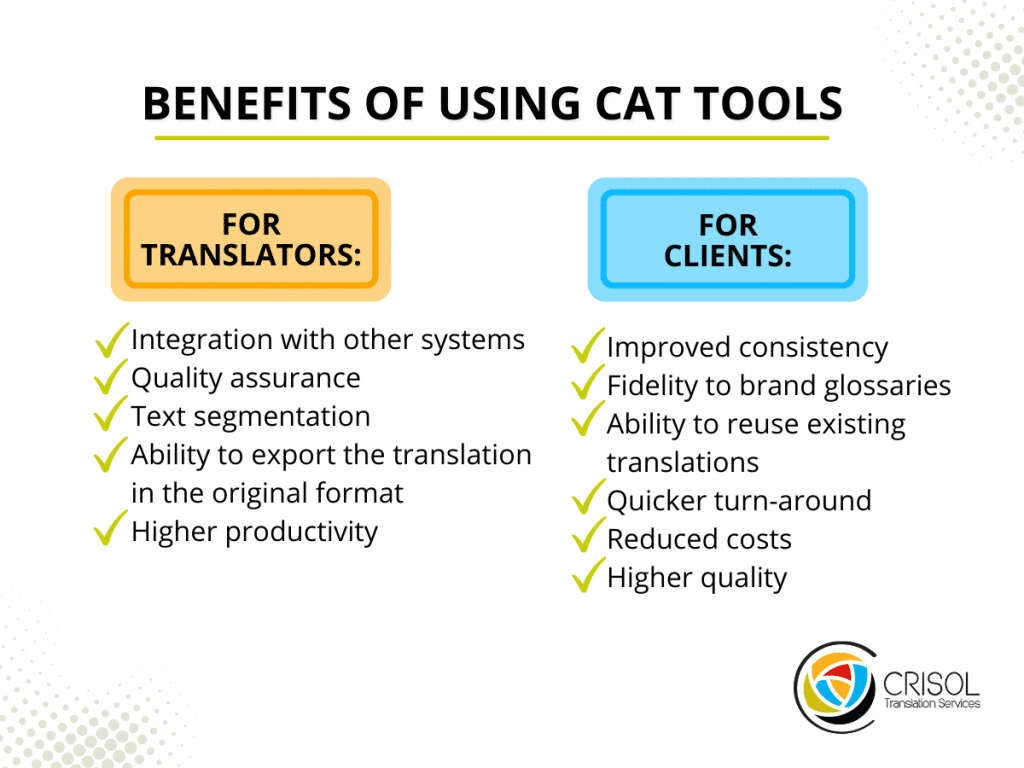
Consistency is one of the hardest aspects of translation to maintain manually. CAT tools store approved translations and terminology so that the same wording is reused in the same context. This reduces variation across documents, versions, and contributors, which is particularly important for technical, legal, and brand-sensitive content.
Faster turnaround on repeat work
CAT tools significantly reduce effort when content overlaps with previous material. As translation memories grow, translators can reuse earlier segments rather than translating everything from scratch. This speeds up delivery on updates, revisions, and recurring content, without sacrificing quality.
Better control over terminology
Terminology control becomes manageable at scale with CAT tools. Glossaries and term bases allow approved terms to be surfaced while translators work, helping prevent drift over time. This is especially valuable for organisations with defined brand language, product naming, or regulated vocabulary.
Reduced risk of human error
CAT tools include built-in quality checks that catch issues difficult to spot manually. These checks flag missing content, formatting problems, inconsistencies, and placeholder errors before delivery. While they do not replace human review, they reduce avoidable mistakes that can slip through under time pressure.
Easier collaboration across teams
Modern CAT tools support collaborative workflows. Multiple linguists can work on the same project while sharing the same translation memories and terminology resources. This makes it easier to scale work without losing coherence, particularly on large or time-sensitive projects.
Better long-term return on translation investment
CAT tools create cumulative value. Each project adds to a reusable linguistic asset base that benefits future work. Over time, this leads to more predictable outcomes, shorter timelines, and better use of budget, especially for organisations with ongoing multilingual needs.
Implementing CAT tools in professional translation workflows
CAT tools deliver value when they are implemented deliberately, not when they are added to a workflow by default.
For organisations using language services, implementation is less about installing software and more about deciding how translation work is analysed, prepared, and maintained over time. CAT tools influence decisions well before translation starts and continue to affect outcomes after delivery.
Where CAT tools enter the workflow
Implementation typically begins during project analysis.
Before translation starts, CAT tools are used to assess the content. This includes identifying new material, content that overlaps with previous work, and partial matches against existing translation memories. These insights inform scope, timelines, and pricing, and help set expectations early.
At this stage, CAT tools act as an analytical layer rather than a production tool.
Use during translation, editing, and proofreading
CAT tools are most heavily used during translation and review.
Translators work inside the CAT environment to produce the target text, drawing on translation memories and terminology resources as guidance. Editors and proofreaders usually operate within the same tool, reviewing content in context and applying changes consistently across segments.
This shared environment reduces friction between roles and limits the risk of contradictory decisions during review.
Final review and delivery considerations
The role of CAT tools during final review varies.
Some teams prefer to conduct final checks inside the CAT tool, using quality checks and consistency views to catch residual issues. Others choose to review the translated content in isolation, particularly for marketing or narrative content, to assess flow without source-text influence.
Both approaches can work. What matters is that expectations are aligned and the review stage is defined clearly.
Delivery is typically handled through structured export. For document-based content, CAT tools return the translation in the original format. For digital content, translations may be handed off through integrations or structured files ready for import.
Why implementation choices matter
CAT tools amplify existing workflows.
When terminology is poorly defined, translation memories are unmanaged, or review responsibilities are unclear, CAT tools surface those weaknesses rather than solving them. When governance is in place, they reduce rework and improve predictability.
For organisations, effective implementation depends on collaboration with translators and providers. Decisions about terminology ownership, memory reuse, and update cycles should be made explicitly rather than assumed.
How does AI fit into modern CAT tools?
Most major CAT tools now integrate large language model (LLM) technology alongside their traditional TM and MT features. The practical applications are still evolving, but several are well-established.
AI-suggested translations go beyond fuzzy matching. Where TM pulls from previously translated segments, AI can generate context-aware suggestions for new content, taking into account the surrounding text, the loaded glossary, and any style guide instructions. This is particularly useful when TM coverage is low, such as at the start of a new client relationship.
AI-assisted quality assurance goes beyond rule-based automated checks. It can flag segments where the translation is technically correct but reads unnaturally, where the register does not match the source, or where a culturally inappropriate phrase has been used. Phrase’s Auto LQA and Auto Adapt features are examples of this approach in production use.
Adaptive MT tracks which MT suggestions a translator accepts and which they correct, feeding that data back to improve future suggestions on the same project. The engine effectively learns from the individual translator’s style and preferences, producing increasingly relevant output as the project progresses.
None of this removes the need for professional translators, particularly for marketing content, legal material, and anything involving cultural nuance. What it changes is the volume of content an experienced translator can handle without compromising their quality standard. For a fuller perspective on where AI is useful and where it creates problems in multilingual content, see our piece on AI in multilingual SEO.
What content types benefit most from CAT tools?
CAT tools deliver the clearest benefit on content that is long, repetitive, technically consistent, or frequently updated. They are less suited to short creative pieces where the value lies in cultural adaptation and creative judgement.
| Content type | CAT tool benefit | Notes |
|---|---|---|
| Technical manuals and user guides | High | Repetitive segments, consistent terminology across versions |
| Legal documents and contracts | High | Exact terminology, clause-level consistency essential |
| Software UI strings | High | Short, repetitive, tag-heavy; TM pays off quickly |
| E-commerce product descriptions | Medium–high | Repetitive structure; brand terminology benefits from glossary |
| Marketing copy | Medium | TM useful for brand terms; less reliable for campaign language |
| Website translation (structural pages) | Medium–high | Good for service and product pages; less useful for editorial content |
| Transcreation | Low | Creative adaptation takes priority over segment-level consistency |
For content in the medium range, including e-commerce localisation and localisation more broadly, CAT tools are most valuable when translators have the freedom to override TM suggestions where appropriate.
How do you choose the right CAT tool?
There is no universal answer. The right tool depends on your role, how you collaborate, your content types, and your budget.
| If you are… | Start with… |
|---|---|
| A freelance translator just starting out | OmegaT or MateCat (both free) |
| A freelance translator working with agencies | Trados or memoQ (check which tool your main clients use) |
| A small team or boutique agency | Smartcat free tier or Wordfast Pro |
| A mid-size agency managing multiple workflows | memoQ or Phrase |
| An enterprise running continuous localisation | Phrase, XTM Cloud, or Trados in a full TMS setup |
| A tech company localising software products | Phrase, Transifex, or Crowdin |
- Beyond role, the questions to work through are:
- What does the licence actually cost over time? (Trados Studio licences start at several hundred euros per year; OmegaT costs nothing)
- Which file formats do you regularly handle? (Check each tool’s supported format list carefully)
- Do you need offline access? (Cloud-only tools require a stable internet connection at all times)
- Does the tool integrate with your CMS, repository, or project management system?
- Which MT engines can it connect to, and at what cost?
- What are the data security and GDPR compliance standards? (Particularly important for legal, medical, or commercially sensitive content)
Working with a translation partner: what to ask about CAT tools
If you are a business commissioning translation (as a client, not as a translator), you do not need to use a CAT tool directly. But it is worth knowing what questions to ask your translation partner.
- Do you use CAT tools on this type of project? For technical, legal, or large-volume content the answer should be yes. For short creative copy it may be no, and that can be the right call.
- Will TM discounts be reflected in my quotes over time? If the same content goes to the same agency repeatedly, a growing TM should reduce costs.
- Who owns the translation memory? This matters if you ever change providers. Your TM represents significant accumulated value, and you should retain a copy.
- Are MT suggestions reviewed by a human translator before delivery? MT-generated content that goes out unreviewed is a quality risk, particularly for marketing and SEO content.
Working with Crisol on CAT-tool-supported projects
At Crisol, CAT tools are part of every project where consistent terminology and translation memory provide a genuine quality benefit. For marketing translation and SEO content, our translators use CAT tools selectively: they apply the TM for brand names, product terminology, and approved phrases, while using their own judgement on the creative and SEO-sensitive segments where consistency should not override naturalness.
If you are planning a multilingual project and want to discuss whether a CAT-tool-supported workflow is the right fit for your content, get in touch and we can walk through the options with you.
Frequently asked questions about CAT tools
What does CAT stand for in translation? CAT stands for computer-assisted translation. It refers to software that professional translators work inside to produce translations, drawing on stored memory and terminology resources to maintain consistency across a project. The human translator remains responsible for every output; the software supports that work.
What is the difference between a CAT tool and machine translation? Machine translation systems such as Google Translate and DeepL produce output automatically. The algorithm does the translating; a human may review that output afterwards, but the system itself operates without human involvement during translation.
A CAT tool works differently. The translator produces each translation manually, working segment by segment inside the software. The tool assists by surfacing matches from a translation memory and flagging terminology, but the translator makes every decision about what the final text says.
In many professional workflows, the two coexist. MT engines are integrated into CAT tools as a suggestion layer, giving translators machine-generated options to work from. Whether those suggestions are accepted or rewritten is always the translator’s call.
Is Google Translate a CAT tool? No. Google Translate is a machine translation engine that generates translations automatically, without a human translator involved at the point of production.
A CAT tool is built around a human-led workflow. The translator works through source content segment by segment, drawing on stored memory and terminology resources to maintain consistency. Every translation decision is theirs.
What is a translation memory and how does it work in a CAT tool? A translation memory is a database that grows with each project. Every time a translator approves a translation, the source and target segments are stored as a pair. On future projects, when the tool encounters content that matches or closely resembles something already in the database, it surfaces that stored translation as a suggestion.
The translator can accept the suggestion or rework it. Over time, a well-maintained translation memory becomes a significant asset: it reduces the time spent on repeated or updated content and keeps terminology stable across multiple projects.
What is the difference between a CAT tool and a TMS? These two types of software serve different purposes.
Translators work inside a CAT tool, segment by segment, drawing on stored translation memory to keep terminology consistent across a project.
A translation management system (TMS) handles the coordination layer above that. Project managers use it to assign work and track progress across a team. In professional setups, the two are usually linked: the TMS organises the workflow, and the CAT tool is where translation takes place.
Which CAT tools do professional translators use most? The most widely used tools are Trados Studio, memoQ, Phrase (formerly Memsource), Smartcat, Wordfast, and OmegaT.
Trados Studio has historically dominated large agency environments. memoQ is popular with freelancers and project managers who need more control over memory and terminology settings. Cloud-based Phrase (formerly Memsource) integrates well with content management systems, which has made it common among teams managing content at scale. OmegaT is open source, which removes licensing costs entirely.
The right tool for a given project depends on the file formats involved and whether integration with a TMS or MT engine is a requirement.
Do CAT tools work for all types of content? CAT tools handle a wide range of formats: Word documents, HTML, XML, software strings, InDesign files, and more. They are well suited to content that has high repetition or gets updated regularly. Technical documentation, software interfaces, and product catalogues all benefit from translation memory reuse, where large portions of content repeat or carry over from one version to the next.
Highly creative content is a different case. Advertising copy and transcreation work depend on the translator reworking language at a level where segment-by-segment consistency is less relevant than overall effect. CAT tools can still be used for these projects, but they are less central to the workflow.
Can CAT tools be used for marketing translation? Yes. For marketing content with repeated phrases or templated structures, CAT tools add clear value: they keep terminology consistent across multiple assets and make updates faster when content changes.
Transcreation is a different scenario. When a campaign needs to be recreated for a new market, the translator is effectively writing new content. The source text becomes a reference for intent and tone, and the segment-by-segment structure of a CAT tool becomes less relevant. Many transcreators still use CAT tools for consistency checks and terminology management, even if memory reuse plays a smaller role.
How do CAT tools affect translation costs? CAT tools affect pricing through match rates. When a segment of new content is identical to something already in the translation memory, it is usually charged at a significantly lower rate than new content. Partial matches sit somewhere in between.
For organisations with ongoing translation needs, this compounds over time. A well-maintained translation memory reduces the cost of content updates and version changes, because large portions of previously translated text can be drawn from memory at reduced rates.
What is a glossary or term base in a CAT tool? A term base is a controlled list of approved terminology covering product names and technical vocabulary that must appear consistently across all translated content.
In a CAT tool, the term base works alongside the translation memory. As the translator works through each segment, the tool flags any approved terms that appear in the source text. This keeps product naming and regulatory terminology stable regardless of which translator is working on a given project.
Related articles:
- What Is a Translation Management System?
- The 10 Best Translation Management Systems on the Market
- Translation Memory: What Is It and What Are Its Main Benefits?
- Will Machine Translation Replace Human Translators?
- The TEP Process: Why It Is a Determinant of Quality

Author: Maria Scheibengraf
Maria Scheibengraf is an English-to-Spanish marketing and SEO translator specialised in software (SaaS, martech, fintech), and Operations Manager at Crisol Translation Services, which she co-founded in 2016. With a solid background in programming and marketing, Maria has an in-depth understanding of the technical intricacies involved in software programs, websites, and digital platforms. Maria is also the author of The SEO Translation Bible.


1 thought on “CAT Tools in Professional Translation: A Practical Guide (2026)”
This was a very insightful blog, thank you! I especially appreciate how you lay out CAT tools as having very positive impacts on the efficiency and productivity for translators – many conversations tend to focus of the negative sides – while they are also valid, it is undeniable that CAT tools are now an integral part, not only of the localisation industry, but also in areas where TM and term bases are fairly set such as legal and technical translation! They aren’t going anywhere, so we have to work with them (and use them to our advantage~)
There is a fascinating article by Ignacio Garcia which highlights the event of post-editing and the significant impact it has on the translation industry. While Garcia brings attention to the tendency to rely on TM pretty much solely, and whether this is a good idea, depending on the industry, he also acknowledges the ubiquity of these softwares and systems, and discusses how translators can better make them collaborators in projects, instead of one working for the other. For many reasons mentioned above, such as the ability to Quality Assure formatting and correct spelling etc., I think CAT tools are the translator’s best friend!
Comments are closed.