
Website translation means making your site work for people who read, search and buy in another language. The hard part is deciding which pages deserve specialist work and who keeps them current after launch. Translate everything the same way and you usually overspend on pages nobody visits while the ones that sell stay weak.
Start with evidence of demand in the target market. Then decide how the pages will be translated and check the finished site before launch.
In this post:
- What is website translation, and how is it different from localisation?
- Why translate your website?
- Which website translation approach should you use for each page?
- How to translate a website, step by step
- What does website translation look like in practice?
- Before you start: a website translation readiness checklist
- One Spanish or several?
- How much does website translation cost?
- How do you know if your translated website is working?
- Website translation mistakes to avoid
- How Crisol Global Marketing Services can help
- Frequently asked questions about website translation
What is website translation, and how is it different from localisation?
Website translation changes written content from one language into another. Website localisation also adapts what a visitor sees and does, such as a checkout form that expects a UK postcode or a product page showing the wrong currency. Most international websites need some of each, depending on the page.
| Website translation | Website localisation |
| Changes the language of product descriptions, help articles or interface labels. | Adapts market-specific information, checkout behaviour or local conventions. |
| Can follow the original page closely when the information is universal. | May require changes to page content and user journeys. |
| A translated delivery policy can still describe UK-only shipping. | A localised delivery policy explains what customers in that market can expect. |
The distinction matters when you write the brief. A translator can produce an excellent Spanish version of a UK returns policy, yet a customer in Mexico still needs to know whether the policy applies to them. We explain the wider process in our guide to localisation.
Website translation also covers content outside the visible paragraphs. Navigation labels, image descriptions, email confirmations and consent messages may sit in different systems. Your inventory needs to account for them before you ask for a quote.
Why translate your website?
Translate your website when customers are already looking for your services in another language. Local-language pages help people find answers to their buying questions and understand whether you serve their market.
Start with overseas enquiries and sales by destination. Then investigate the search terms people use locally. A direct translation of an English keyword can miss how customers describe the same service. Our article on culture and search behaviour explains why search wording changes across markets. For a market-by-market method, see our multilingual keyword research guide.
Spain and Mexico can have different buying questions even when the product is identical. Local keyword research helps you decide whether those audiences need separate pages.
The business case is stronger when the destination page can answer a real buying question. A local-language homepage helps people recognise your brand, but it will do little for search visibility if the service pages they need remain in English.
Which website translation approach should you use for each page?
Choose the workflow by the page’s purpose and the consequences of an error. Machine translation suits some low-risk material. Pages designed to win search traffic deserve specialist attention.
| Page type | Suggested approach | Why |
| High-traffic service or category page | SEO translation with specialist review | Local search intent and buying language determine what belongs on the page. |
| Homepage or campaign landing page | Human translation or transcreation | Positioning and calls to action need to sound credible in the market. |
| Product catalogue with repetitive attributes | MTPE, with terminology controls | Post-editing can make large volumes manageable when data is structured. |
| Help centre with low-risk instructions | Machine translation plus sampled review | Fast coverage may be suitable if the limitations are clear and the content is monitored. |
| Legal terms, safety information or regulated claims | Qualified human translation and specialist checking | An inaccurate condition or warning can have serious consequences. |
| Frequently changing informational pages | Proxy or CMS workflow with defined quality checks | Updates need a repeatable route from source change to approved translation. |
| Checkout and account interface | TMS-supported translation with in-context testing | Short strings can fail when buttons, variables or forms are assembled on screen. |
Raw machine translation is the quickest way to create a first pass. Machine translation post-editing (MTPE) adds a human review of that output, with the level of intervention agreed beforehand. Human translation starts with a translator making the language decisions. SEO translation adds research into how the target audience searches, then uses that evidence to shape page content. Read our guides to the translation proxy and machine translation and human review.
A website rarely needs one workflow everywhere. Give the pages that bring in enquiries more editorial attention than repetitive reference material.
How to translate a website, step by step
Start with market demand and a plan for the translated URLs. Prepare content so linguists can see how each string will appear, then review the pages in context before launch. Once the language versions are live, measure whether visitors find them and complete the actions you intended.
1. Pick your markets and define success
Choose countries or language audiences from commercial evidence. Set a goal for each locale, such as qualified enquiries from Spain or completed purchases in Mexico. Decide which team will answer those enquiries once they arrive.
Look at the pages already attracting international visitors. If traffic is concentrated on two product lines, those may deserve attention before the corporate history page. Use SEO translation for pages where local search demand is part of the business case.
2. Decide how each language will live on your site
Settle the URL structure before translations are produced. Decide whether visitors will see a language directory, a subdomain or a country-specific domain. Each option needs maintenance, analytics and a reliable way for search engines to discover the translated pages. Document the choice for developers and content owners so new pages follow the same pattern. A directory structure such as /es/ works well when one team manages the whole site; country-specific domains require separate upkeep.
Give each language version its own stable URL. Avoid relying on automatic redirects based solely on location, because people travel and may prefer a different language. A visible language switcher lets them change their choice.
3. Prepare the content for translation
On a fintech app we reviewed, an English promotion still displayed a £900 figure even though the surrounding copy used euros. A linguist flagged the mismatch, we asked the client, and the answer was shared across all languages.
A spreadsheet would not have shown how the amount looked in the finished screen. Check currency and other commercial details in context before launch. The readiness checklist below covers string extraction and protected placeholders before files go to translators.
4. Translate and review in the right workflow
A translation management system (TMS) helps move content between the site and reviewers. Phrase and Lokalise support in-context workflows when configured for the project. Our translation management systems guide compares the options.
Give reviewers access to the live layout or staging site. A short label can become misleading when it appears on a button with limited space.
5. Launch the language versions correctly
Publish translated pages on their planned URLs and connect equivalent versions with hreflang where relevant. Hreflang helps Google show the right language version; the page itself still has to earn the ranking.
Check that each hreflang annotation points to a real, indexable page and that reciprocal annotations agree. Use the correct language-region codes. Test a language switch from a product page to its equivalent, instead of sending visitors back to the homepage.
Test navigation and forms on mobile as well as desktop. Confirm that confirmation emails arrive in the intended language and that local users can complete the journey without being pushed back to English.
6. Measure, maintain and improve
Review search impressions and clicks by locale after launch. Compare the pages that attract visits with those that lead to enquiries or sales. Keep a process for translating source changes so the English and translated versions stay aligned.
Record the date of publication and major changes so you can interpret shifts in performance. Review queries alongside landing pages: a translated page attracting irrelevant traffic needs better targeting.
Assign someone to approve new content for each locale. Without that owner, a multilingual site can become a collection of old prices and expired claims, even if its initial launch was carefully managed.
What does website translation look like in practice?
TrueLayer, the open banking provider, asked us to translate its website into Spanish, German, French, Lithuanian and Norwegian. One section, “How can I use open banking payments?”, packs five interface components into a single screen:
- a display heading;
- three feature columns;
- a checklist;
- an accordion;
- a checkout widget.
Each component set its own limits on what the translation could do.
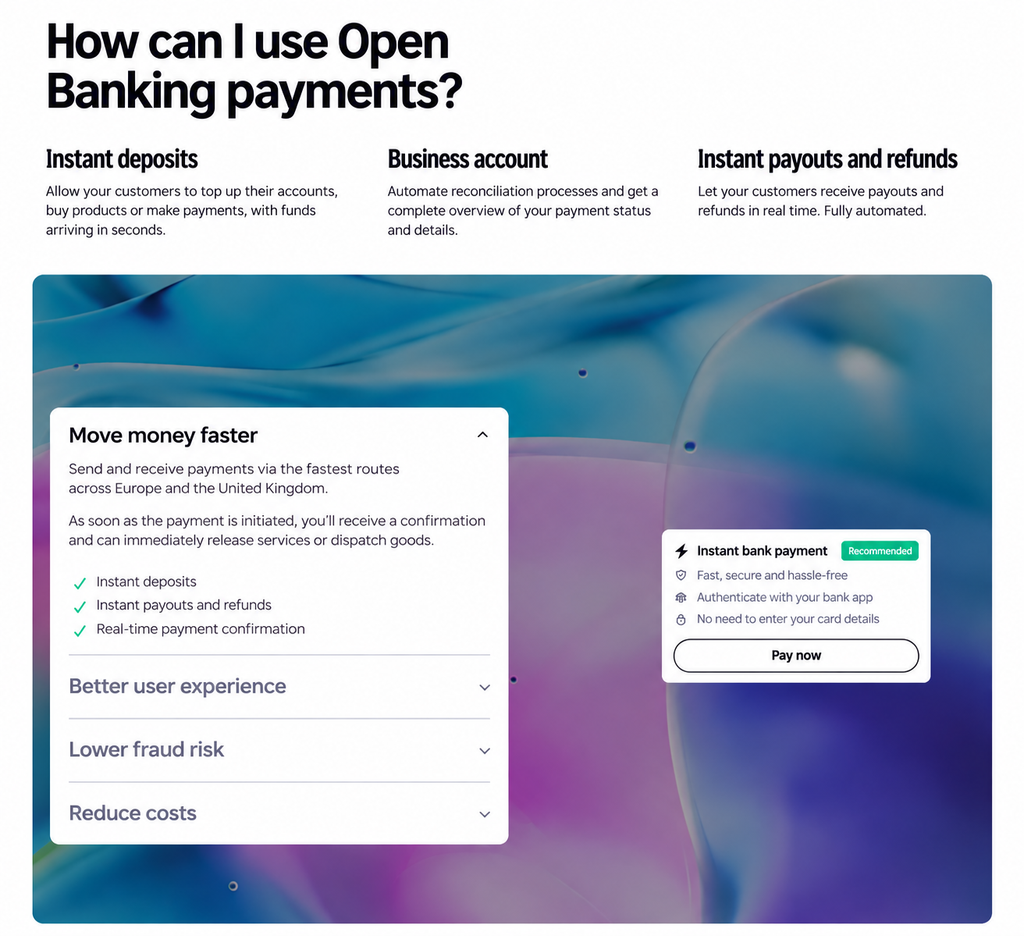
The section heading: line breaks and special characters
The H2 is set in a tall, condensed display font across two lines. That gave us two things to check.
- Where the line breaks. For Spanish, “¿Cómo utilizo los pagos / por open banking?”, and for German, “Wie kann ich Open Banking / Payments nutzen?”, both break between natural phrases. A break inside a phrase in a 60-point heading is the first thing a native reader notices.
The heading also does SEO work. It is an H2 on a page that needs to rank in Spain and Germany, so it carries the term people search for in each market: “pagos por open banking” and “Open Banking Payments”.
The feature columns: keeping three headings aligned
The three columns sit side by side, each with a short heading and two or three lines of text. The design works when all three headings fit on one line, so the body text starts at the same height.
| Column heading | Spanish | Characters | German | Characters |
| Deposits | Depósitos inmediatos | 20 | Echtzeitüberweisungen | 21 |
| Merchant account | Cuenta comercial | 16 | Händler-Konto | 13 |
| Payouts and refunds | Retiros y reembolsos inmediatos | 31 | Auszahlungen und Rückerstattungen in Echtzeit | 45 |
The Spanish fits on one line in all three columns. The German third heading runs to two lines, which pushes its body text one line lower than its neighbours.
A shorter German term would have lost the meaning, so the full term stayed and the layout absorbed the extra line. The alternative is a fixed minimum height for every column heading, which keeps the text aligned in all languages. That decision belongs to the developers, and the translator’s job is to flag it.
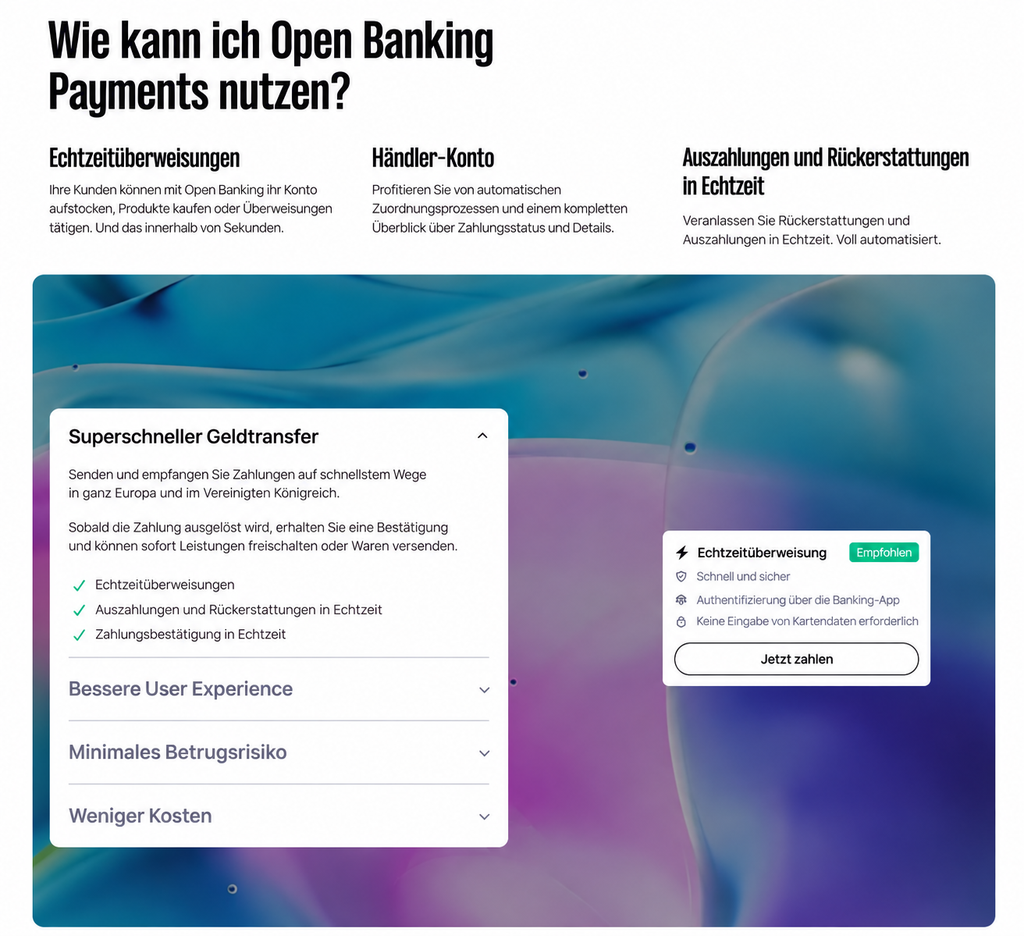
The checklist: one line per item
The expanded accordion panel holds a three-item checklist with a tick icon on each line. Each item had to fit on a single row next to its icon, so we kept every item as a short noun phrase: “Depósitos inmediatos”, “Echtzeitüberweisungen”.
The checklist repeats the names of the feature columns. Using the exact same wording in both places tells the reader these are the same features.
The accordion and collapsed headings
Only the first accordion panel opens by default. For most visitors, the three collapsed headings are the whole message, so each one has to make sense alone and fit on one line next to the chevron.
| Accordion heading | Spanish | Characters | German | Characters |
| User experience | Mejora las experiencias de tus usuarios | 39 | Bessere User Experience | 23 |
| Fraud | Disminuye el fraude en los pagos | 32 | Minimales Betrugsrisiko | 23 |
| Costs | Reduce costes | 13 | Weniger Kosten | 14 |
The Spanish user-experience heading is the longest string in the panel and fills most of its width. German is usually the language that breaks layouts, but here Spanish runs longer, because German says the same thing in a compact noun phrase. Text expansion depends on the string, so every component needs checking in every language.
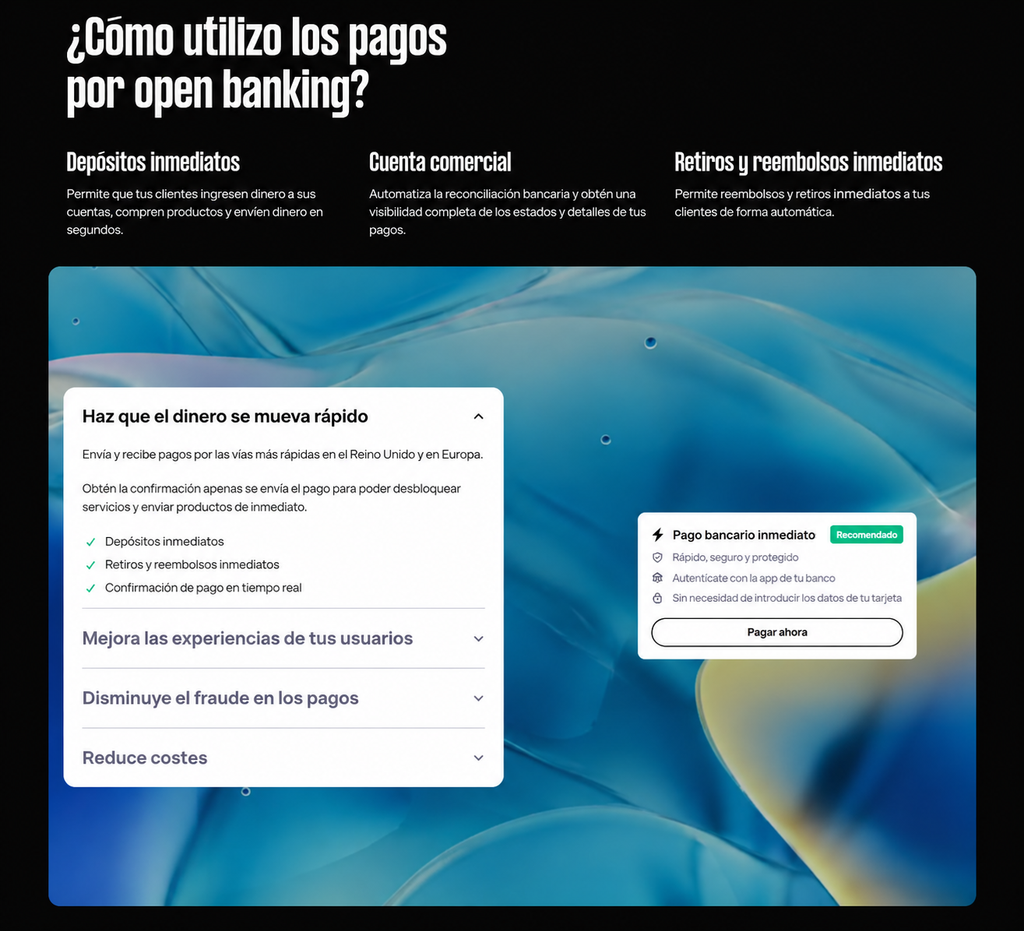
The checkout widget: a fixed-width card
The widget is the tightest space on the page. The title shares its row with a green badge, and each feature line sits next to an icon.
| Element | Spanish | Characters | German | Characters |
| Title | Pago bancario inmediato | 23 | Echtzeitüberweisung | 19 |
| Badge | Recomendado | 11 | Empfohlen | 9 |
| Card line | Sin necesidad de introducir los datos de tu tarjeta | 52 | Keine Eingabe von Kartendaten erforderlich | 43 |
| Button | Pagar ahora | 11 | Jetzt zahlen | 12 |
In Spanish, the title and badge together nearly fill the row, and the card line runs almost the full width of the card. Any longer and either line would wrap or truncate, and a truncated line next to a payment button undermines trust.
The button label stays short in both languages, so it sits centred in the button with room on each side.
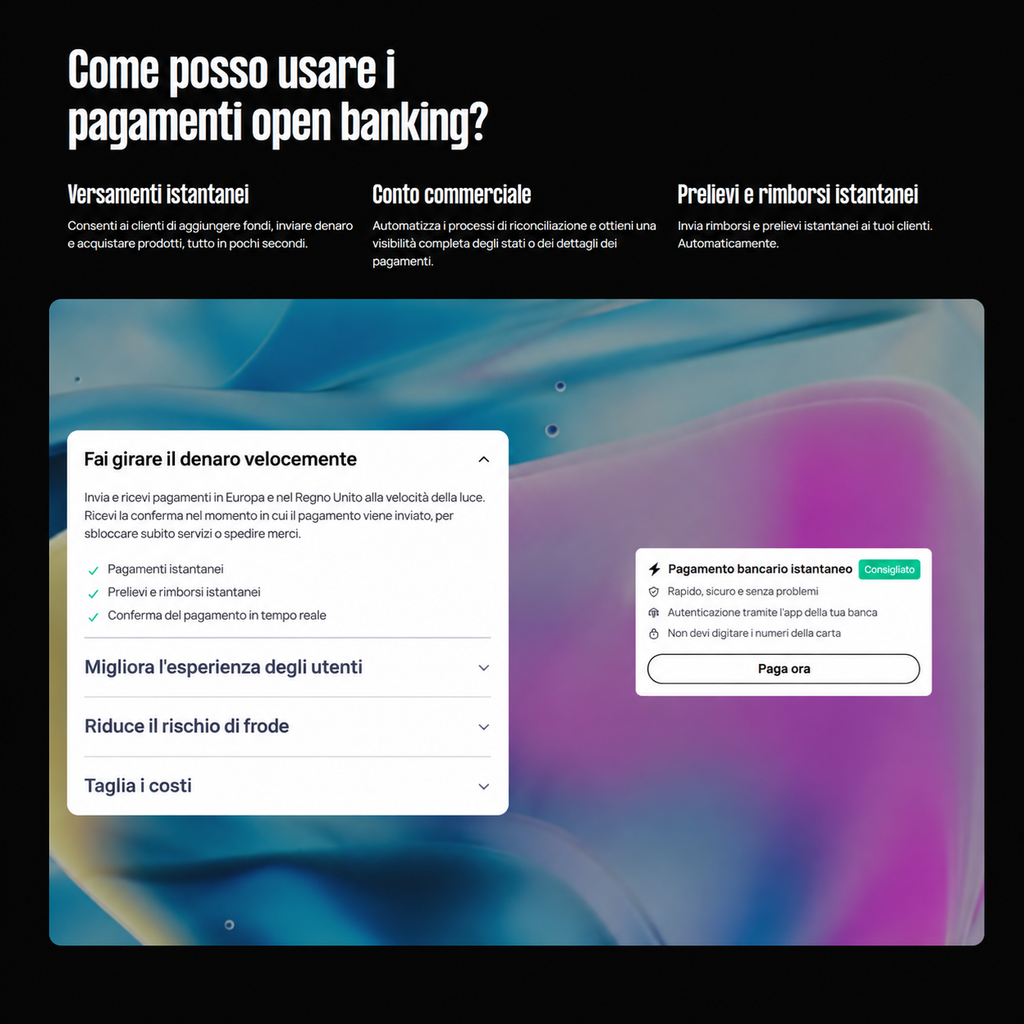
How to check all this before launch
None of these problems shows up in a spreadsheet of strings. A translator reading “Instant payouts and refunds” in a cell has no way to know it sits in a narrow column next to two shorter headings.
For interface copy, ask the client for one of these:
- Screenshots of each component, so translators see where every string sits.
- Character limits per string, set by the design team.
- Access to a staging site, where translated pages can be reviewed in place before they go live.
Then review every language on screen, at desktop and mobile widths. Long strings that fit on desktop often wrap or truncate on a phone.
Before you start: a website translation readiness checklist
Run this check before handing files to a translation team. It catches practical gaps that otherwise appear during review, when they cost more to resolve.
· List the pages and interface strings in scope, including forms and automated emails.
· Confirm how text will be extracted from the CMS or application.
· Mark variables and placeholders that must remain intact, such as {first_name} or %s.
· Allow room for text expansion in buttons and page layouts.
· Identify screenshots and images containing text that needs adaptation.
· Agree a stable URL structure and the language codes to use.
· Name an owner for terminology and approvals in each locale.
· Set up staging access so reviewers can check the translated site in context.
· Define how updates will reach the translated versions after launch.
· Record the conversions and search metrics you will measure by locale.
Subdirectories, subdomains or country domains?
Subdirectories are often practical for businesses maintaining several languages on one main website. Subdomains and country domains can also work, especially when teams or market requirements differ. Choose the structure you can maintain consistently and check it with your developer before translation begins.
| Structure | Example | Practical consideration |
| Subdirectory | example.com/es/ | Keeps language versions within one domain and often one CMS. |
| Subdomain | es.example.com | May suit a separately managed publishing system. |
| Country domain | example.es | Signals a country focus but adds a separate domain to maintain. |
Whichever structure you choose, give translated pages crawlable links and check your canonical tags. Google’s guidance on managing multilingual sites explains the technical choices, including hreflang.
One Spanish or several?
A single Spanish version can be a sensible starting point when your offer and search intent are similar across markets. Separate versions become more useful when the terminology, buying process or page content differs between Spain and Latin America. The decision should follow audience research and the pages you can realistically maintain.
For example, “ordenador” is common in Spain while “computadora” is familiar in much of Latin America. That difference may matter in support content, but the bigger issue for a commercial page is the phrase people search for. A page targeting Spain may need different keywords and examples from one targeting Mexico.
The language code es-ES identifies Spanish for Spain. The code es-419 refers to Spanish for Latin America and the Caribbean, and can be useful when one regional version serves several countries. Where country-specific content exists, you may instead need es-MX, es-AR or another appropriate locale. Use hreflang to identify the available alternatives.
Accents also matter in page copy and search queries. Check how special characters survive your CMS and export process; see our guide to diacritics and accents in SEO.
A regional Spanish page still needs editorial judgement. A Mexican buyer may expect a different payment method or contact route from a customer in Spain. We cover linguistic differences in Latin American Spanish versus European Spanish.
If you start with one Spanish version, make its intended audience clear in the brief. Review search performance by country before commissioning more variants. Adding a second version is worthwhile when you can make it meaningfully useful and keep both up to date. If country-level reports reveal sustained demand for different terminology or offers, commission a separate variant with its own page plan. Duplicating every Spanish URL without a clear audience distinction creates maintenance work.
How much does website translation cost?
Request a quote based on a complete page inventory. Count forms and metadata alongside the visible copy. Our translation cost guide explains what affects the budget.
When budgets are tight, prioritise pages that can attract qualified visitors and help them take the next step. Translate the supporting pages those visitors need to complete their journey.
A sensible first release could include a high-intent service page and its enquiry form, followed by the explanations visitors need before contacting you. Scope those pages together so the journey stays usable.
Keep maintenance in the budget. Product changes and new legal requirements can make a once-accurate translation misleading. A defined update process is cheaper to manage than discovering six months later that the translated site has been left behind.
How do you know if your translated website is working?
Measure the translated site against the goal you set for each market. Search visibility tells you whether people can find the pages, while enquiries or transactions show whether those visits are useful. Look at individual locales and landing pages so strong results in one country do not hide problems in another.
In Google Search Console, track non-branded search impressions by locale. Compare them with qualified enquiries or conversions in your analytics. Review these figures against the target you set before launch.
Check technical health alongside performance. An excluded page or a faulty language switcher can prevent the translated version from being seen. Review your hreflang implementation after major site releases, particularly when URLs change.
Website translation mistakes to avoid
The most common website translation problems start before the translator receives the content. A project may have the right words but the wrong market assumptions, or it may launch with important interface text still in English. These checks help protect the work you have already paid for.
· Translating the whole site without prioritising. Start with the pages that serve a clear market need, then expand when the results justify it.
· Using English keywords as the Spanish keyword plan. Validate search language locally before deciding on page titles and headings.
· Treating a proxy as a quality guarantee. A delivery method cannot judge whether a claim makes sense to the target audience.
· Skipping in-context review. A short label can be mistranslated even when the sentence looked fine in the translation file.
· Publishing without a maintenance owner. Assign responsibility for changed prices and updated source pages.
· Sending visitors to the wrong locale. Test hreflang, switchers and contact routes, especially where several Spanish versions exist.
If your site sells across borders, localisation also affects product discovery and checkout expectations. Our e-commerce localisation guide goes into that work in more detail.
How Crisol Global Marketing Services can help
We help businesses choose which pages to translate first and prepare them for local search. Our translation and localisation services cover translation and in-context review, while our international SEO work helps plan how local audiences find those pages. The fintech currency issue described above shows why review needs to happen on the finished screen. Contact us to discuss your website.
Frequently asked questions about website translation
Can I translate my website with Google Translate?
Machine translation can provide a first draft for low-risk pages. Have a linguist check content that affects a purchase decision or explains how to use a product. Review the text on the published page as well, since a correct sentence can still appear in the wrong place or be cut off.
Do I need a separate website for each language?
No. You can publish translated pages in subdirectories on one domain, with separate URLs for each language version. Subdomains and country domains are also valid choices. What matters is that visitors can reach the right page, switch languages easily and use the site without being redirected unexpectedly.
Will translating my website improve SEO?
Translated pages give you a chance to appear for searches in another language. Start by checking which terms people use in the target market. Then write page titles and content around those searches. Check indexing and local-language search performance in Search Console after the pages go live.
Should I translate my entire website at once?
A phased launch is usually easier to manage. Begin with pages that answer a clear buying question in the target market. Include the supporting information visitors need to complete their enquiry or purchase. Review performance before adding more pages, so the next round of work follows evidence.
What should I give a website translation agency?
Give the agency a page inventory and access to the source content. Identify the target markets and the person who will approve terminology. A staging site lets reviewers see the translation in context before launch, including text that appears only after someone submits a form or encounters an error.

Author: Maria Scheibengraf
Maria Scheibengraf is an English-to-Spanish marketing and SEO translator specialised in software (SaaS, martech, fintech), and Operations Manager at Crisol Translation Services, which she co-founded in 2016. With a solid background in programming and marketing, Maria has an in-depth understanding of the technical intricacies involved in software programs, websites, and digital platforms. Maria is also the author of The SEO Translation Bible.


